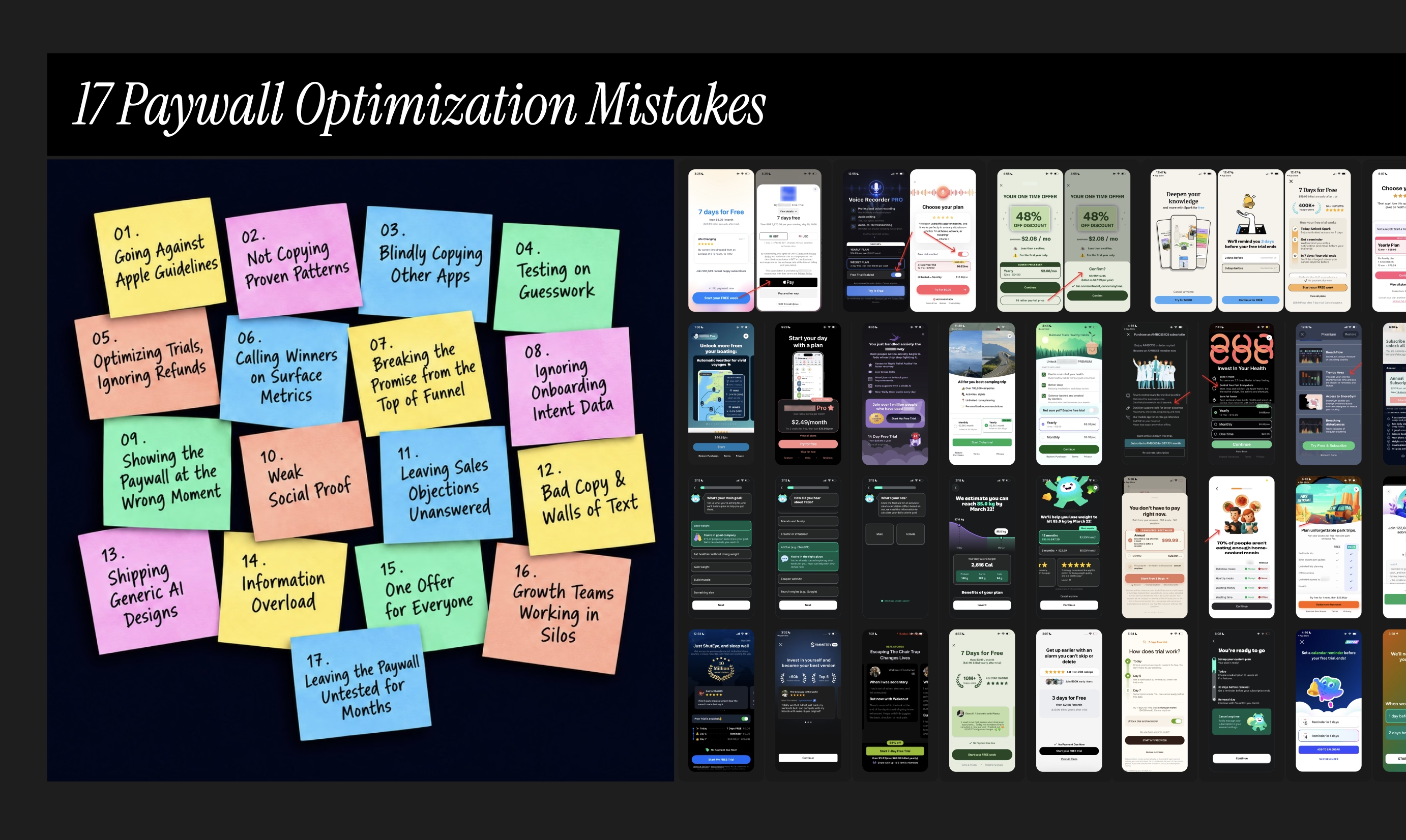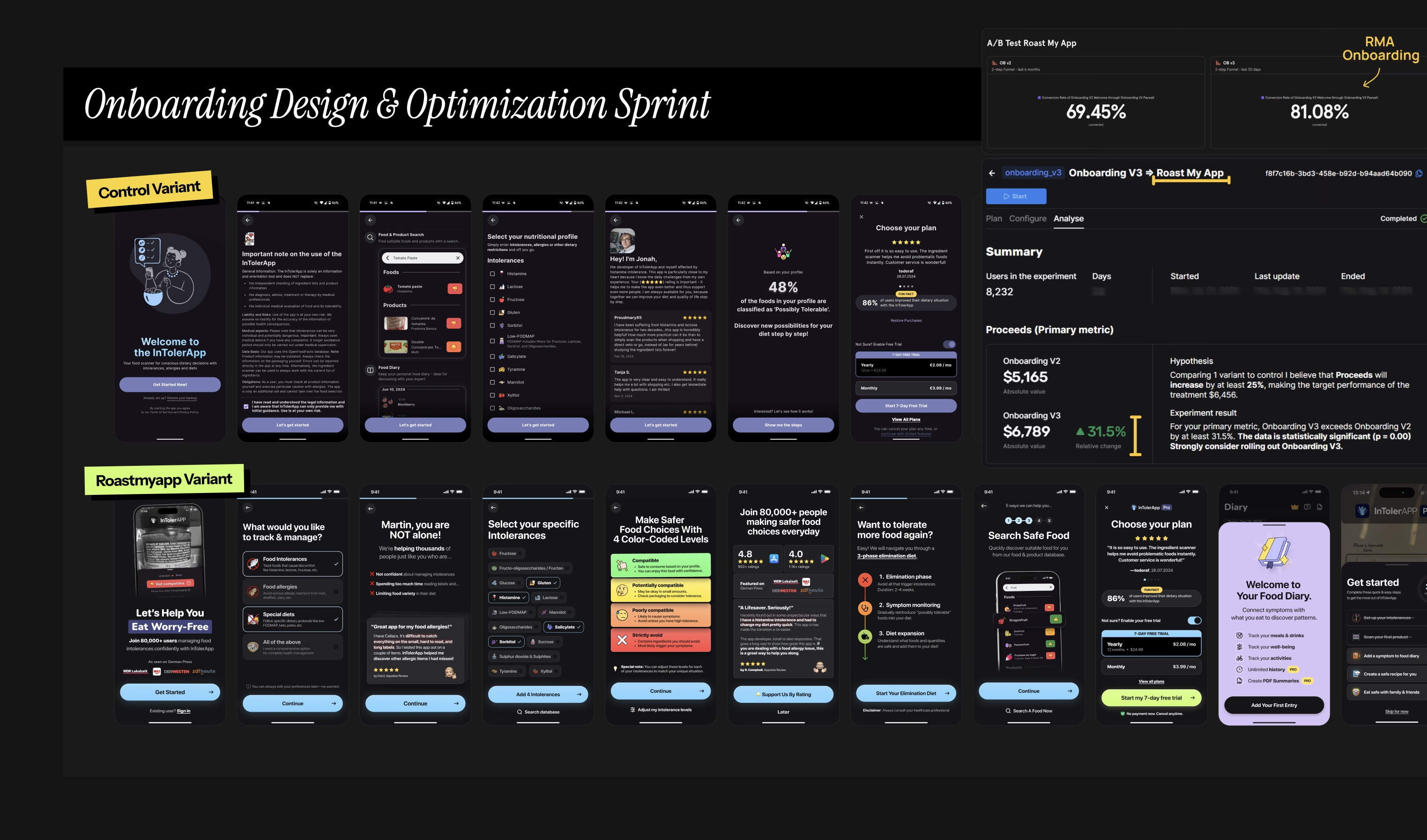
51 Paywall Experiments [With Examples] To Grow Your Mobile App Revenue

Based on how $1M-$10M+ ARR teams approach their mobile app monetization strategy in 2026

51 paywall experiments [with examples] Figma board

Image: 51 paywall experiments [with examples] Figma board

I handpicked 51 paywall experiments [with examples] to grow your app revenue without increasing your existing traffic.

Before we start, here’s the link to my Figma board, with all 51 paywall experiments across 5 app monetization levers.

Like always, none of these paywall screens was taken out of UI libraries like Mobbin or Screensdesign. All paywall examples are from mobile apps I personally downloaded, started trials & cancelled subscriptions from.

This is the continuation of my 187+ paywall-ranking exercise article I published earlier. ICYMI, tap on the image below...
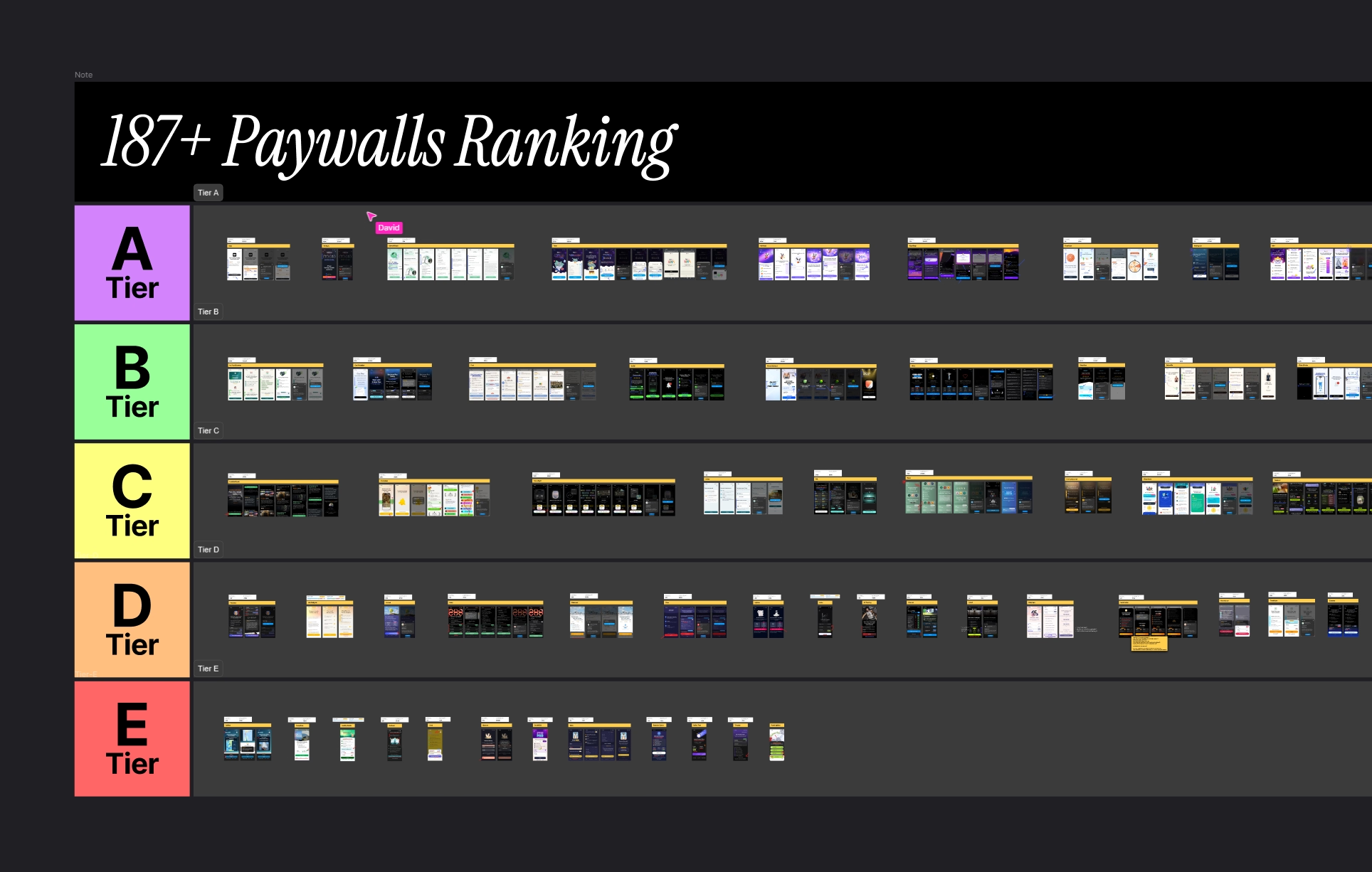
21 high-converting paywall examples article image

Image: I ranked 187+ paywalls into 5 tiers
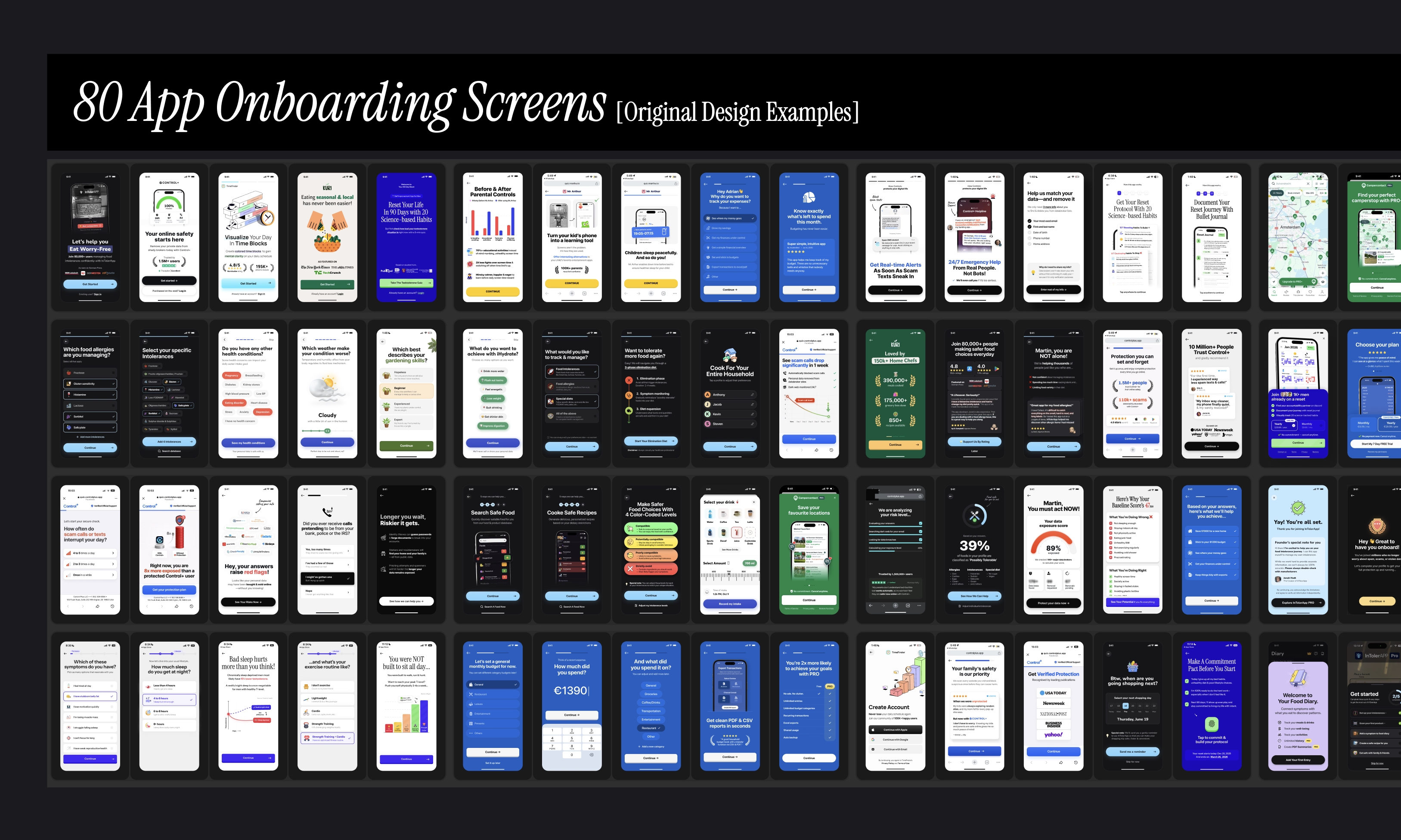
“This is a really, really good compilation. Needed some app2web references. Thank you!”- Yasir, Reframes

5 app monetization levers for you to pull + the complete list of 51 paywall experiments

I’ll begin with a fair warning. This article is going to be exhaustingly long. You definitely wanna bookmark this for later. Or ask your favourite LLM tool to create a markdown file from it.

Feel free to share this on your team’s Slack. [I know, as if you didn’t have enough ideas already sitting in your backlog, haha].

I organized each of these paywall experiments across 5 monetisation growth levers [or “focus areas”, which is the term I use on my mobile app monetization & CRO framework → ]

Once you’re inside my Figma board, follow the “arrows” to find out the variant changes, UI elements, and design patterns in question.

You’re gonna feel tempted to start running tests randomly off this resource. But I wouldn’t recommend doing so because there’s a much smarter way.

Structure your experiments by focusing on 1 lever at a time. In that way, you can easily understand what impacts your revenue growth the most.

Prioritise your test ideas first with your team using the RICE score. Determine your highest-leverage experiments based on your app’s unique situation.

[Btw, if you want me to do this for you, submit your app here →]

Small disclaimer: a couple of paywall experiments in this list may [or may not] get flagged during Apple review. Meaning, don’t blindly test everything you see online. Always proceed with caution.

With that out of the way, here’s the complete list of all 51 paywall experiments…

Lever #1: Paywall design & setup

  • Exp #1: Single-screen scrollable layout vs. 3-screen multi-step paywall
  • Exp #2: In-app payment only vs. compliant app-to-web checkout design
  • Exp #3: Banned free-trial toggle vs. Start free-trial radio button
  • Exp #4: Remove analysis paralysis with “see all plans” button
  • Exp #5: Stripe billing with “Apple Pay” as default payment method vs custom-designed webpage with “card payment method” as default
  • Exp #6: Easy-to-notice “pay in-app” button vs. Low visual weight “pay in-app” button
  • Exp #7: Display no “pay in-app” button, but instead use a fallback in-app paywall for returning users from the web browser
  • Exp #8: Show pricing plan cards vs. show 1 pricing only in single-line, fine-print
  • Exp #9: Conventional checklist paywall vs. Bare-minimum [but compliant] paywall
  • Exp #10: Display abstract icons/illustrations vs. Real app UI mockups
  • Exp #11: Keep paywall CTA button as the only highest-contrast visual element
  • Exp #12: Plain-old paywall CTA button vs. Paywall CTA button with increased height [& subtle animation]
  • Exp #13: Relocate “terms, privacy & restore purchase” links from paywall footer
  • Exp #14: Utilize time delay during “in-app purchase sheet open” with additional reassuring content
  • Exp #15: Design post-purchase UX flow with screens that eliminate buyer’s remorse

Lever #2: Pricing & offering

  • Exp #16: Offer “yearly vs. higher-priced yearly” as your default subscription plans
  • Exp #17: Present your highest-LTV plan [typically annual] as the no-brainer deal
  • Exp #18: Offer a free trial on only 1 plan out of multiple
  • Exp #19: Nudge towards app-to-web checkout with higher discounted pricing
  • Exp #20: Offer 7-day free reverse trial that starts automatically without IAP
  • Exp #21: Facilitate multiple purchases with upsell offers, right after trial activation
  • Exp #22: Offer carefully priced lifetime option [typically 3-10X+ more than the annual price]
  • Exp #23: Anchor pricing with “weekly-yearly” subscription plan combination
  • Exp #24: Allow users to “design trial” with 7-day free or 30-day paid intro offer

Lever #3: Content & messaging

  • Exp #25: Paywall screen with only social proofs & trust-building elements
  • Exp #26: Minimize friction with sales objection-handling copy around CTA button
  • Exp #27: Use simple, active-voice headline copy
  • Exp #28: Use high-friction CTA button copy vs. Low-friction CTA button copy
  • Exp #29: Hero “before-&-after transformation” visual assets
  • Exp #30: Show “7-day transformation journey/timeline” to set realistic expectations
  • Exp #31: Faceless corporate/money-driven paywall vs. Founder-led, purpose-driven paywall
  • Exp #32: Include “FAQ section” as your last resort to remove buyer anxiety & billing surprises
  • Exp #33: Display “save %” badge vs. “save $$$” badge

Lever #4: Promotion offers

  • Exp #34: Add “exit offer” with 50-75%+ discount to your onboarding paywall
  • Exp #35: Offer no trial in default paywall products. But offer a free trial on the paywall exit
  • Exp #36: Offer no trial in default paywall products → Offer trial on 1st exit → Offer discount on 2nd exit
  • Exp #37: Cascade offering based on paywall view count [free trial → 1st discount → 2nd discount]
  • Exp #38: Offer no trial in default paywall → Offer discount with direct purchase on 1st exit → Offer discount with free trial on 2nd exit [risky]
  • Exp #39: Offer “end-your-trial-now” discount to trial-activated-users for direct purchase
  • Exp #40: Embed discounted redemption offer on subscription cancellation flow
  • Exp #41: Use push notification as a placement for promotion offers
  • Exp #42: Allow users to claim one-time offer during app uninstallation

Lever #5: Personalization

  • Exp #43: Display onboarding quiz inputs with dynamic text placeholders
  • Exp #44: Contextualize paywall hero image & headline with dynamic content placeholders
  • Exp #45: Tailor trial-end reminder notifications based on users’ selected preference
  • Exp #46: Tailor offerings based on user acquisition source
  • Exp #47: Tailor offerings based on age demographic/purchasing power
  • Exp #48: Display user-generated assets/uploaded media as your hero image
  • Exp #49: Tailor paywall content based on specific points of user journey & level of intent
  • Exp #50: Tailor paywall content based on Apple ads keywords & CPP screenshots messaging
  • Exp #51: Localize paywall content & pricing based on your storefront country

Quick side quest → How I structure paywall experiments for roastmyapp customers

This list of 51 paywall experiments would be useless if you didn't have a system to run them through. I’d rather you steal my system than my list. So here’s mine quickly…
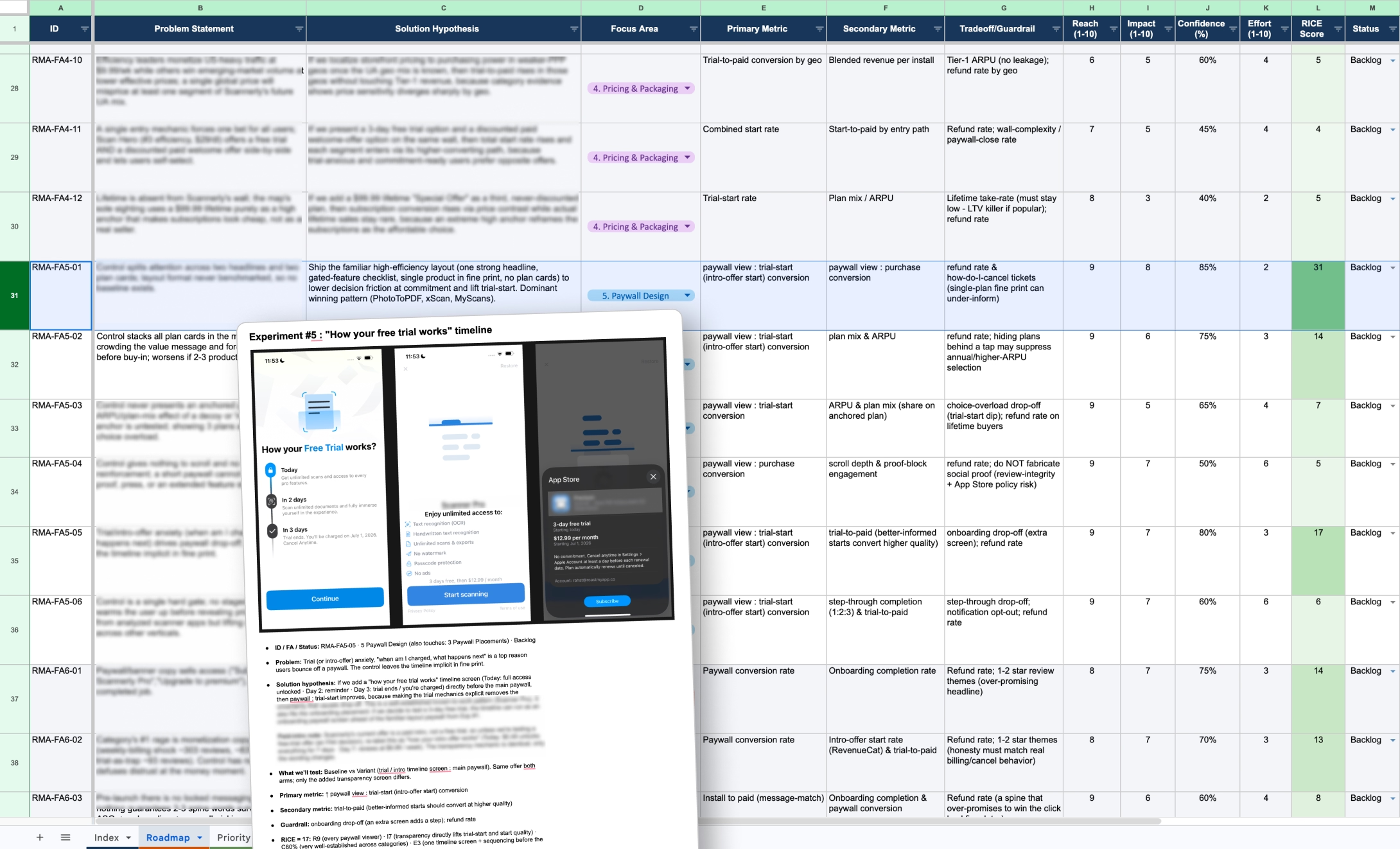
  • Every test idea we run for a client comes out of an intensive groundwork phase first. Read more on how I approach this here →
  • Every experiment we could potentially run for a team gets dumped into a Google Sheet and scored with RICE
  • Your backlog sorts itself after that. Highest leverage experiments float to the top based on your app’s unique situation.
Mobile app monetization & CRO roadmap deliverables for Roastmyapp Clients

Image:  Mobile app monetization & CRO roadmap deliverables

Each experiment we run next is documented in a Google Doc. This is what we include in our hypothesis-impact brief:

  • The problem → solution hypothesis → rationale & evidence
  • Control & test variant designs
  • Primary KPIs, guardrails & baseline numbers
  • Specific segment [eg. country, user acquisition source, or platform iOS vs Android]

After an experiment ends, the same doc gets the receipts:

  • Sample size reached
  • Test run duration
  • Results and deltas
  • Key insights, takeaways & recommended next step

Why go through all this trouble when your experiment data already lives on the Revenuecat/Superwall tab?

I believe every team should build their own “experiment learnings bank”.

Imagine your “one-source-of-truth library” for every growth initiative you’ve shipped in your business lifetime. It can live on Notion, Google Drive, or wherever you want. The goal is to stop running in circles by starting your experimentation program from zero every quarter.

This is my specific approach on how to compound my learnings. Even if experiments fail, you get to translate them later down the line into revenue growth. If you need help implementing this growth discipline, submit your app here →

TLDR: Monetization growth systems > One-off random tests.

End of side quest.
Let’s get to the best bits.
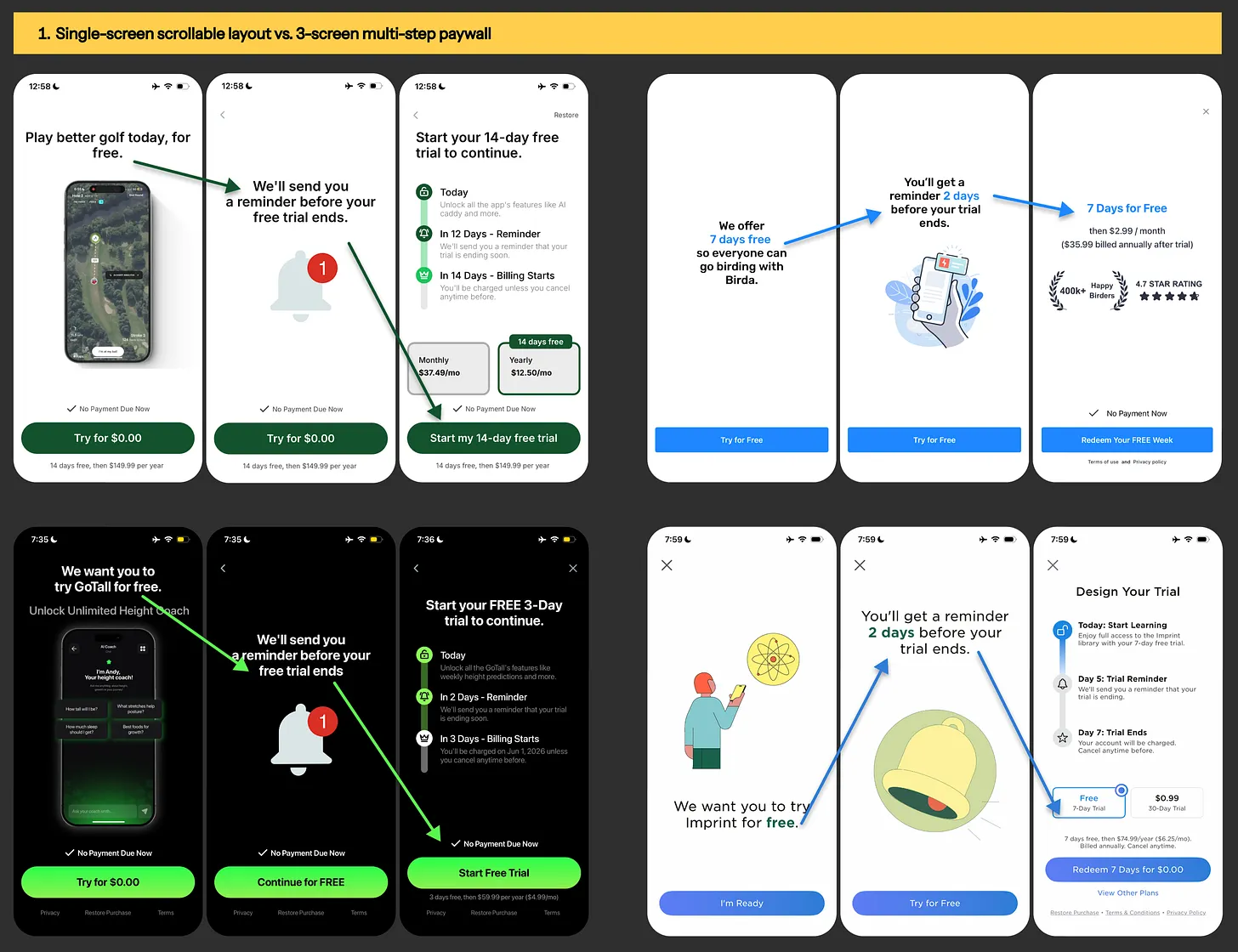
Experiment #1: Single-screen scrollable layout vs. 3-screen multi-step paywall

Paywall designs from Scratch AI, Birda, GoTall & Imprint app
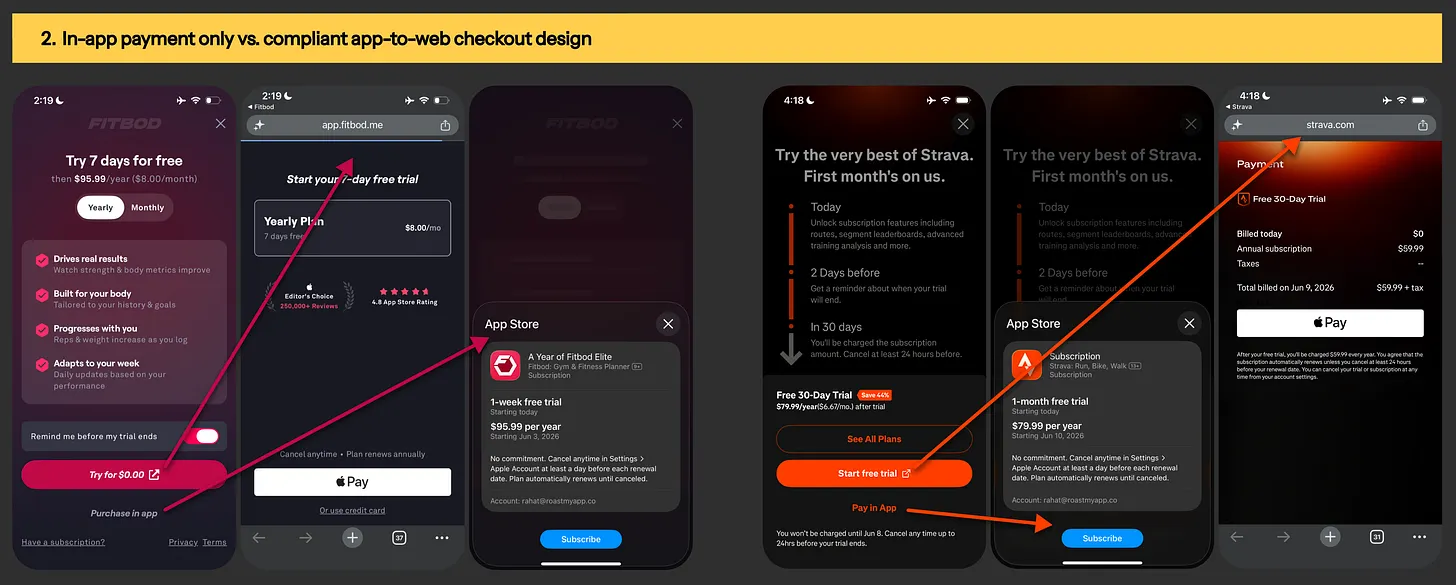
Image: Paywall designs from Scratch AI, Birda, GoTall & Imprint

Experiment #2: In-app payment only vs. compliant app-to-web checkout design

App2web checkout example from FitBod & Strava app
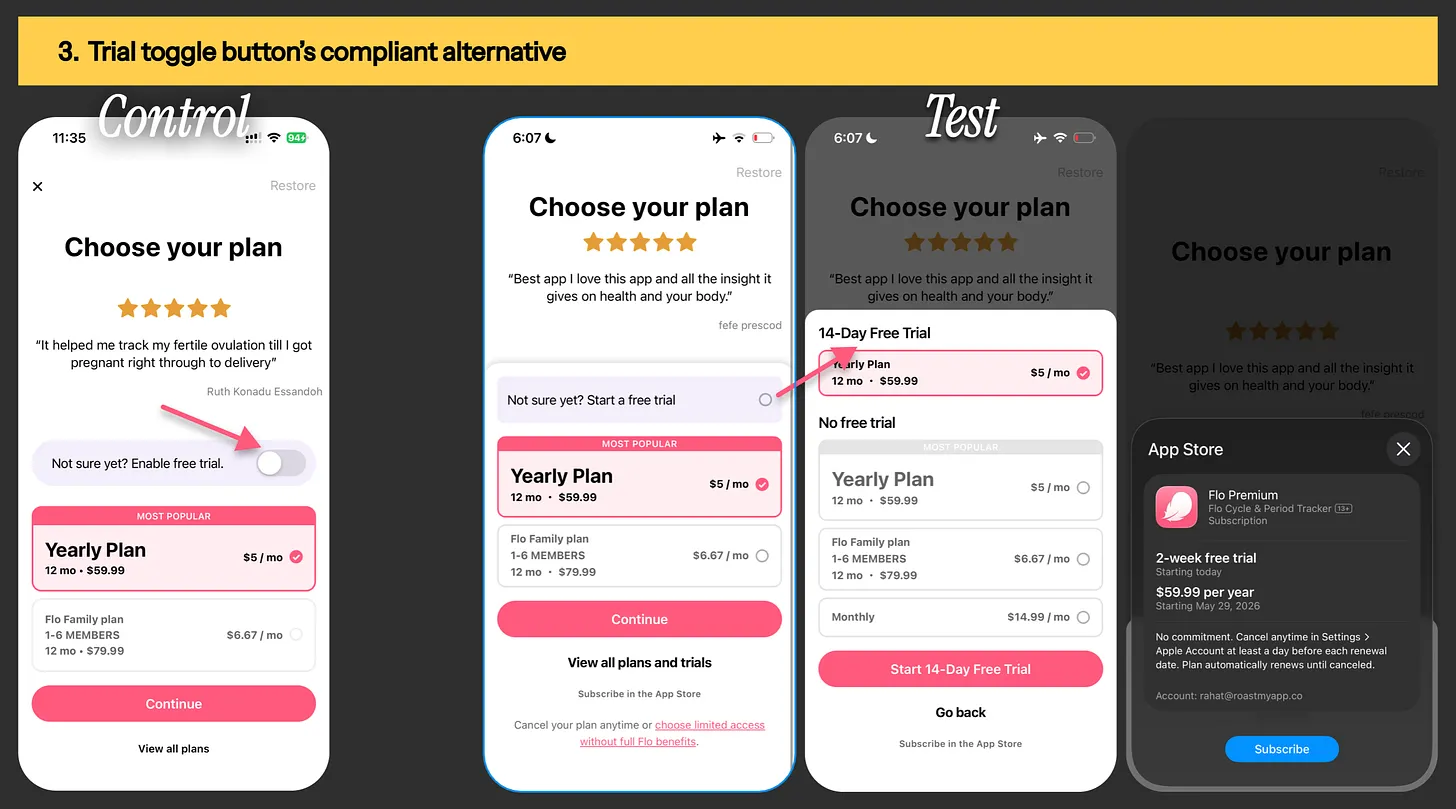
Image:  App2web checkout example from FitBod & Strava app

Experiment #3: Banned free-trial toggle vs. Start free-trial radio button

Flo period tracker app's trial-toggle button experiment
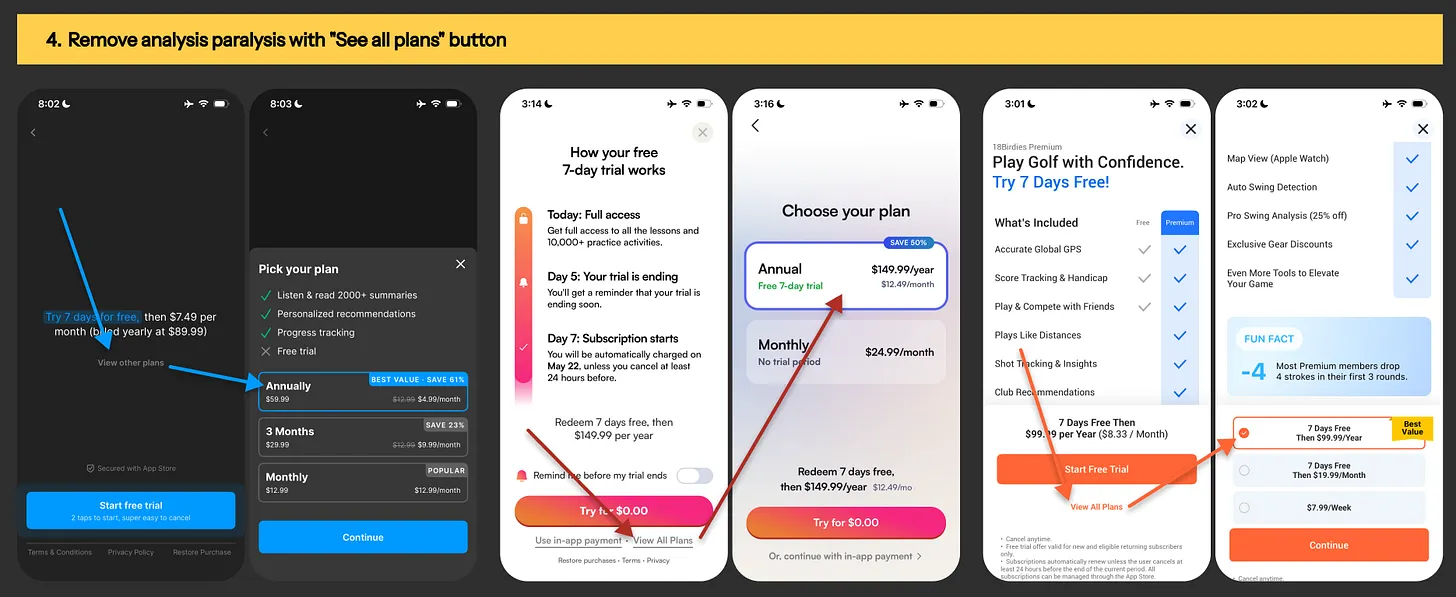
Image: Flo period tracker app's trial-toggle button experiment

Experiment #4: Remove analysis paralysis with “view all plans” button

Paywall examples from Headway, BoldVoice & 18Birdies
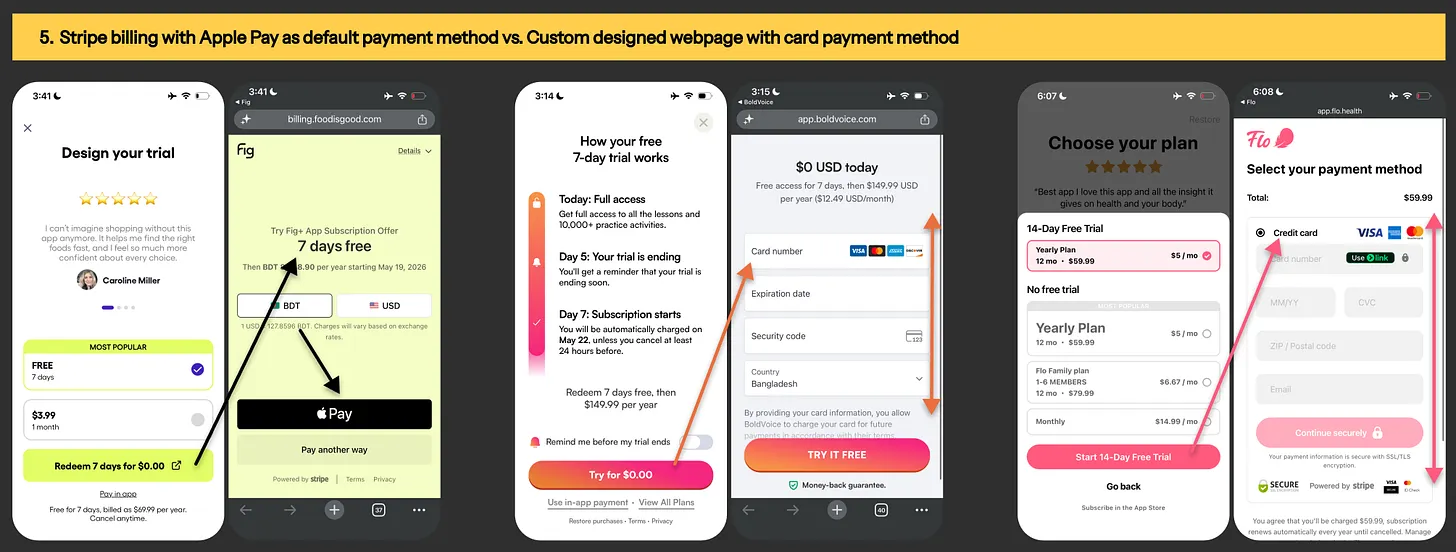
Image: Paywall examples from Headway, BoldVoice & 18Birdies

Experiment #5: Stripe billing with “apple pay” as default payment method vs custom-designed webpage with “card payment method” as default

App2web checkout in Fig, BoldVoice & Flo app
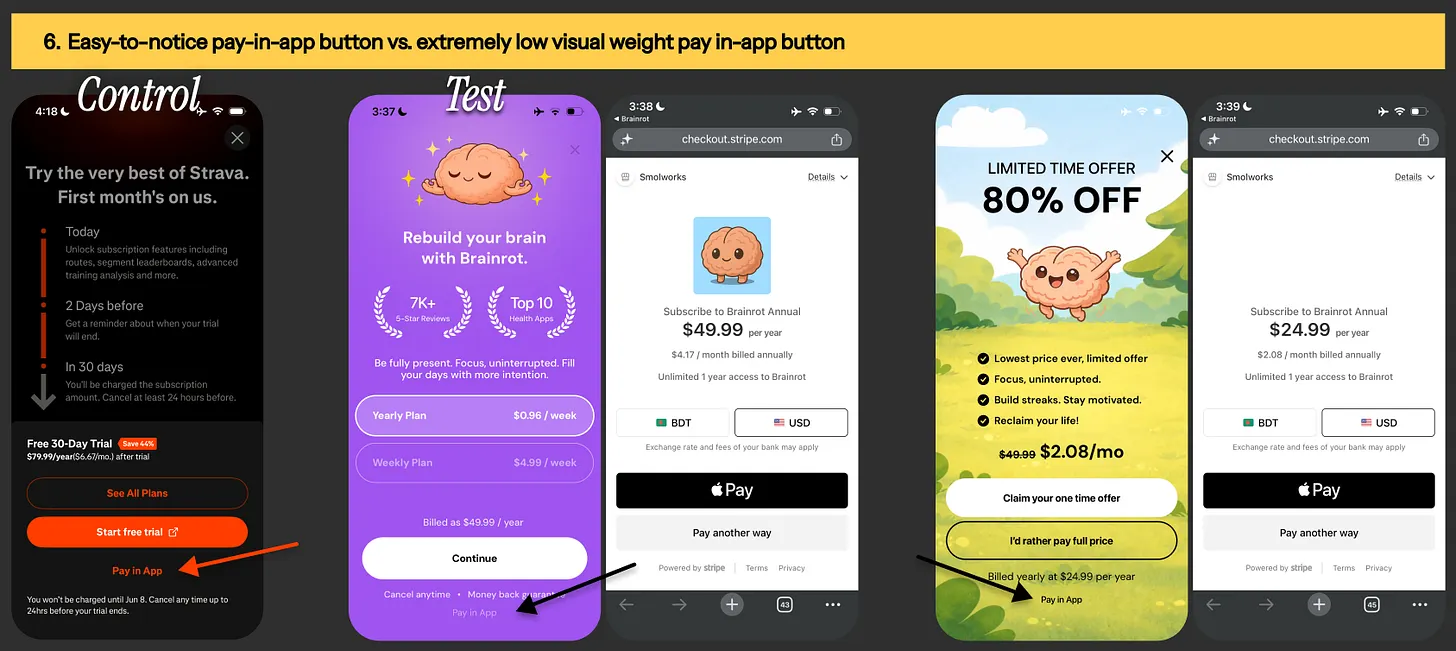
Image: App2web checkout in Fig, BoldVoice & Flo app

Experiment #6: Easy-to-notice “pay in-app” button vs. extremely low visual weight “pay in-app” button

Paywall designs from Strava & Brainrot app
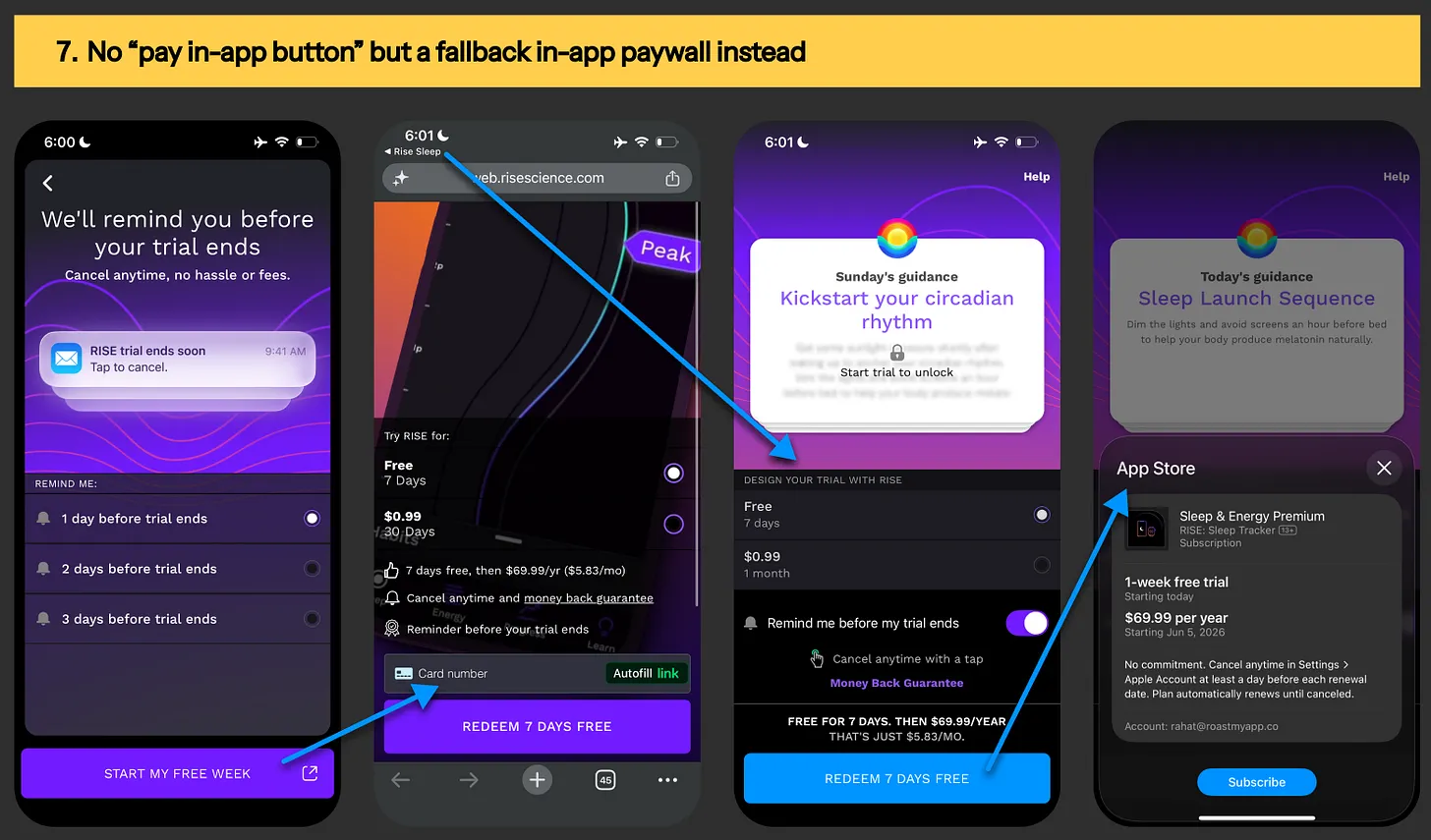
Image: Paywall designs from Strava & Brainrot app

Experiment #7: Display no “pay in-app” button. Use fallback in-app paywall for returning users from the default browser

App2web with in-app fallback paywall from Rise sleep app
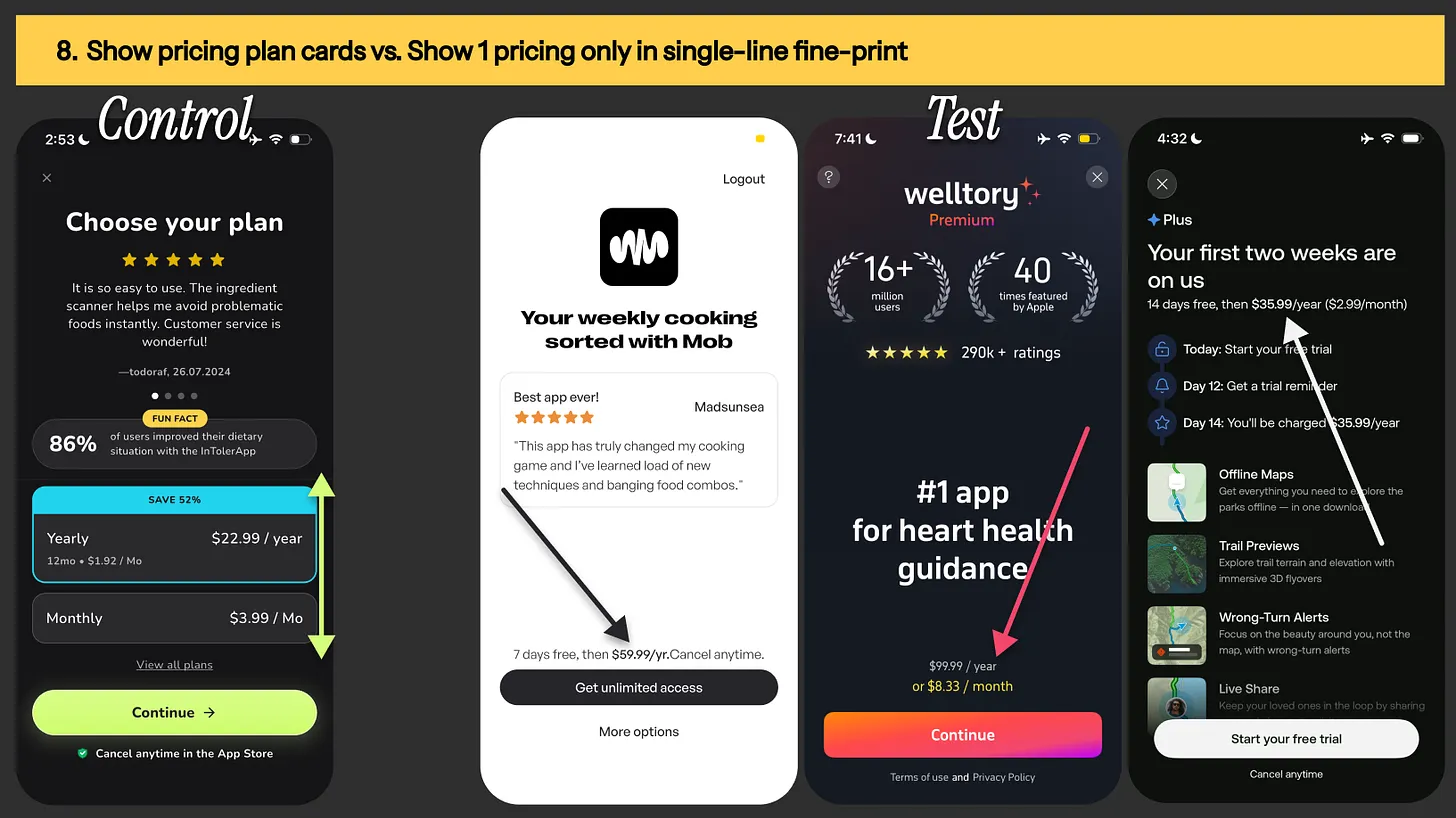
Image: App2web with in-app fallback paywall from Rise sleep app

Experiment #8: Show pricing plan cards vs. Show 1 pricing only in single-line fine-print

Paywall examples from InTolerApp, Mob, Welltory & AllTrails app
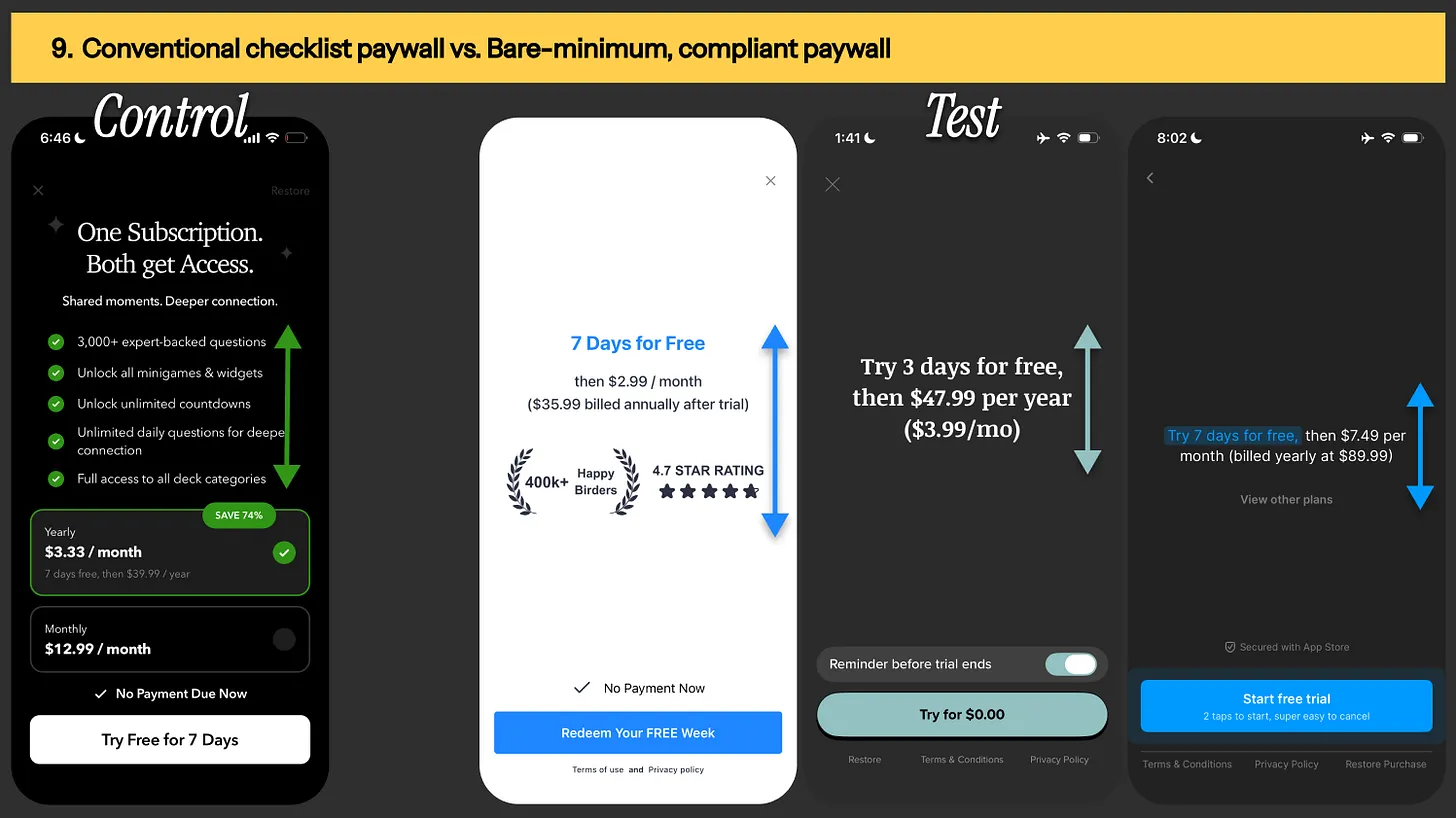
Image: Paywall examples from InTolerApp, Mob, Welltory & AllTrails app

Experiment #9: Conventional checklist paywall vs. bare-minimum [but compliant] paywall

Paywall design from Candles, Birda, Vocabulary & Headway app
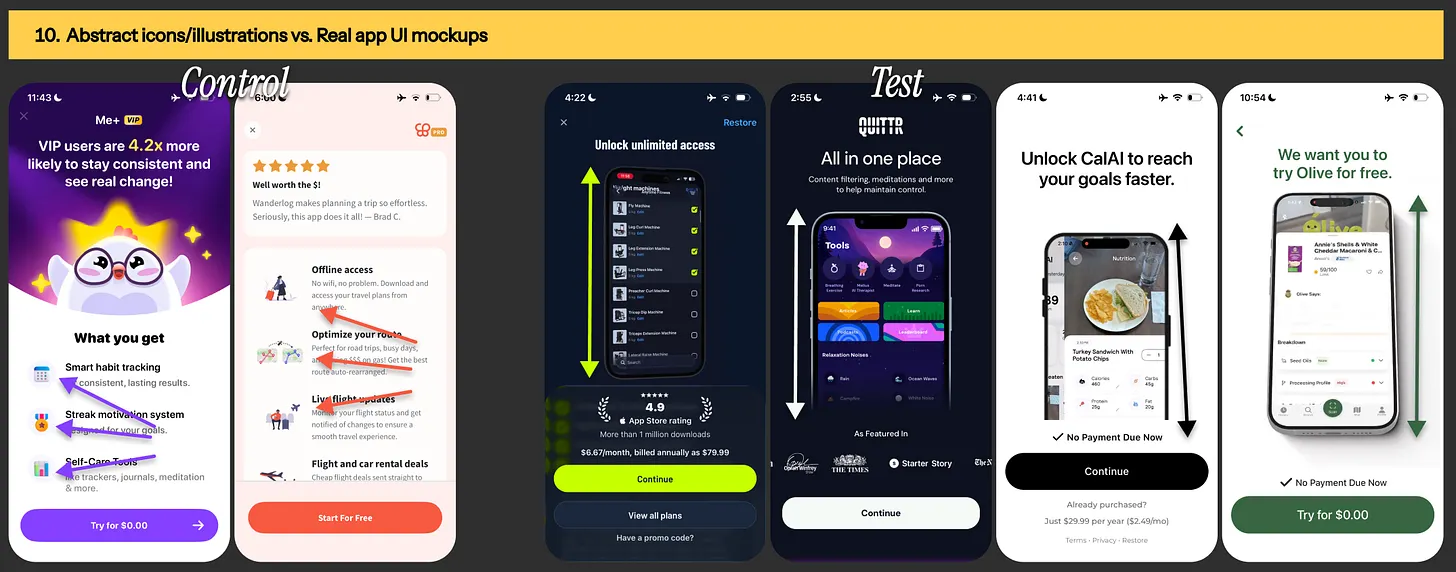
Image: Paywall design from Candles, Birda, Vocabulary & Headway app

Experiment #10: Display abstract icons/illustrations vs. real app UI mockups

 Wanderlog, Me+, Gravl, Quittr, Cal AI & Olive paywalls
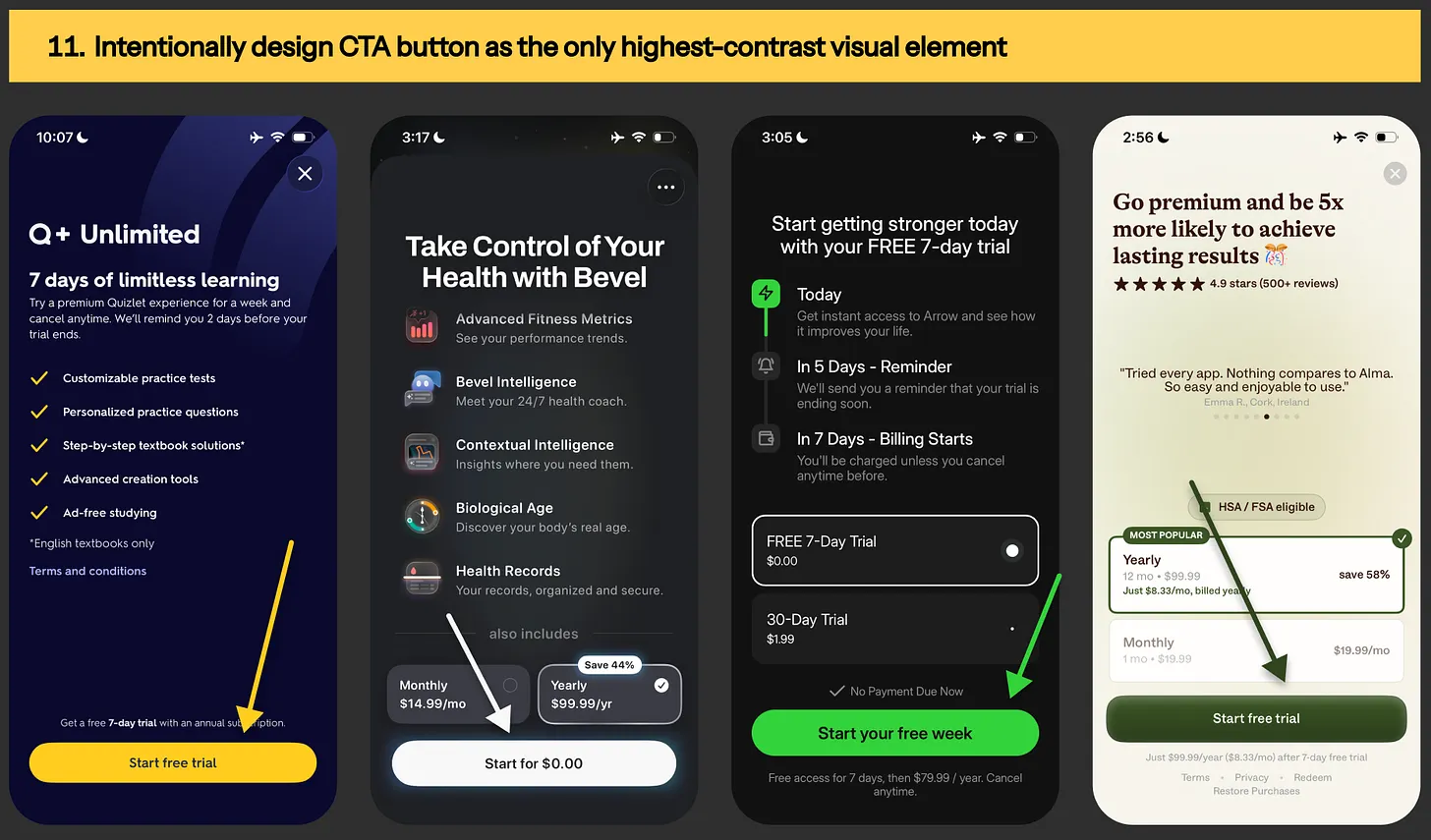
Image: Wanderlog, Me+, Gravl, Quittr, Cal AI & Olive paywalls

Experiment #11: Keep paywall CTA button as the only highest-contrast visual element

Paywall design from Quizlet, Bevel, Arrow & Alma nutrition app
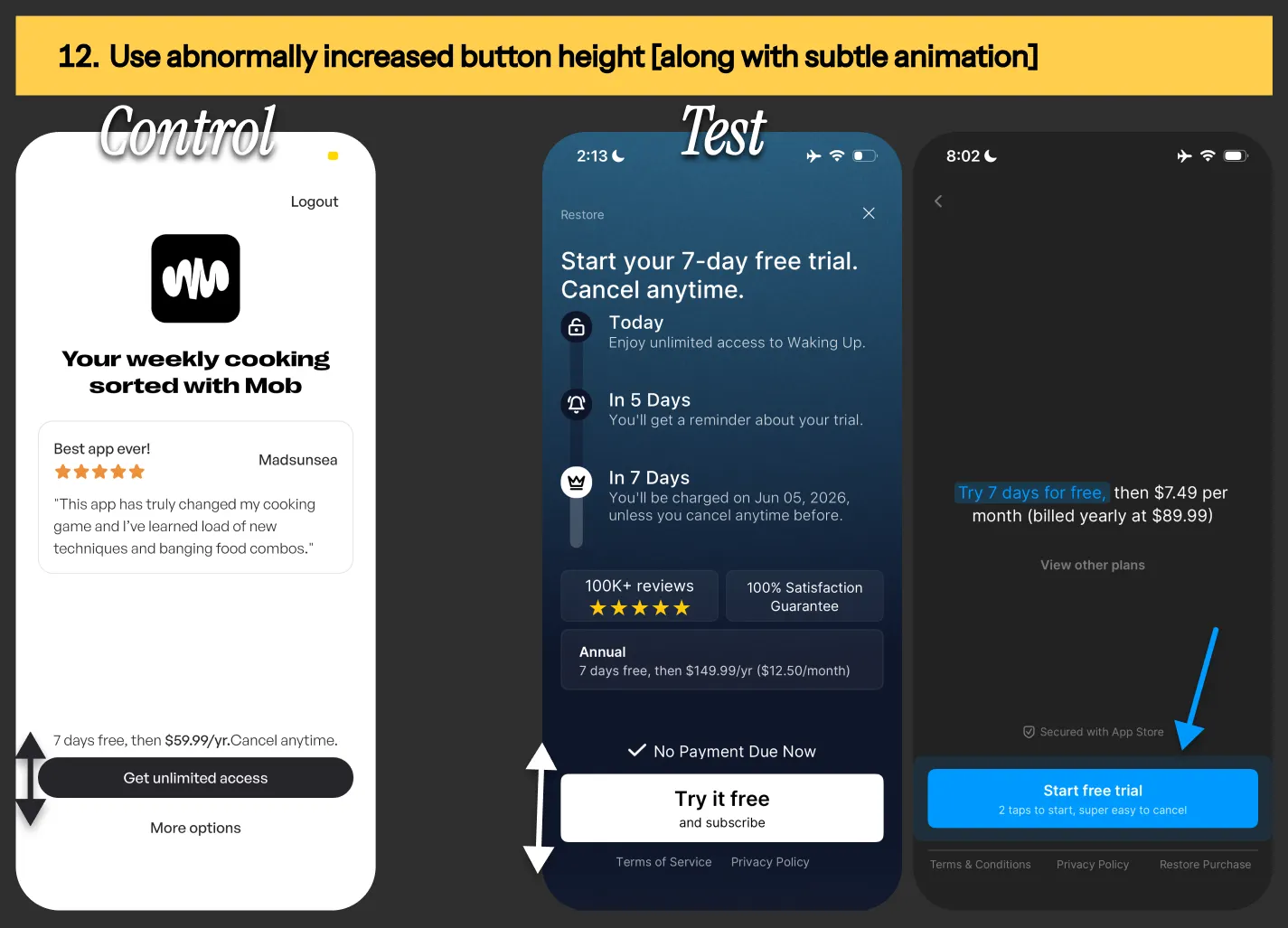
Image: Paywall design from Quizlet, Bevel, Arrow & Alma nutrition app

Experiment #12: Plain-old paywall CTA button vs. Paywall CTA with increased button height [& subtle animation]

Paywall CTA button from Mob, Waking up & Headway app
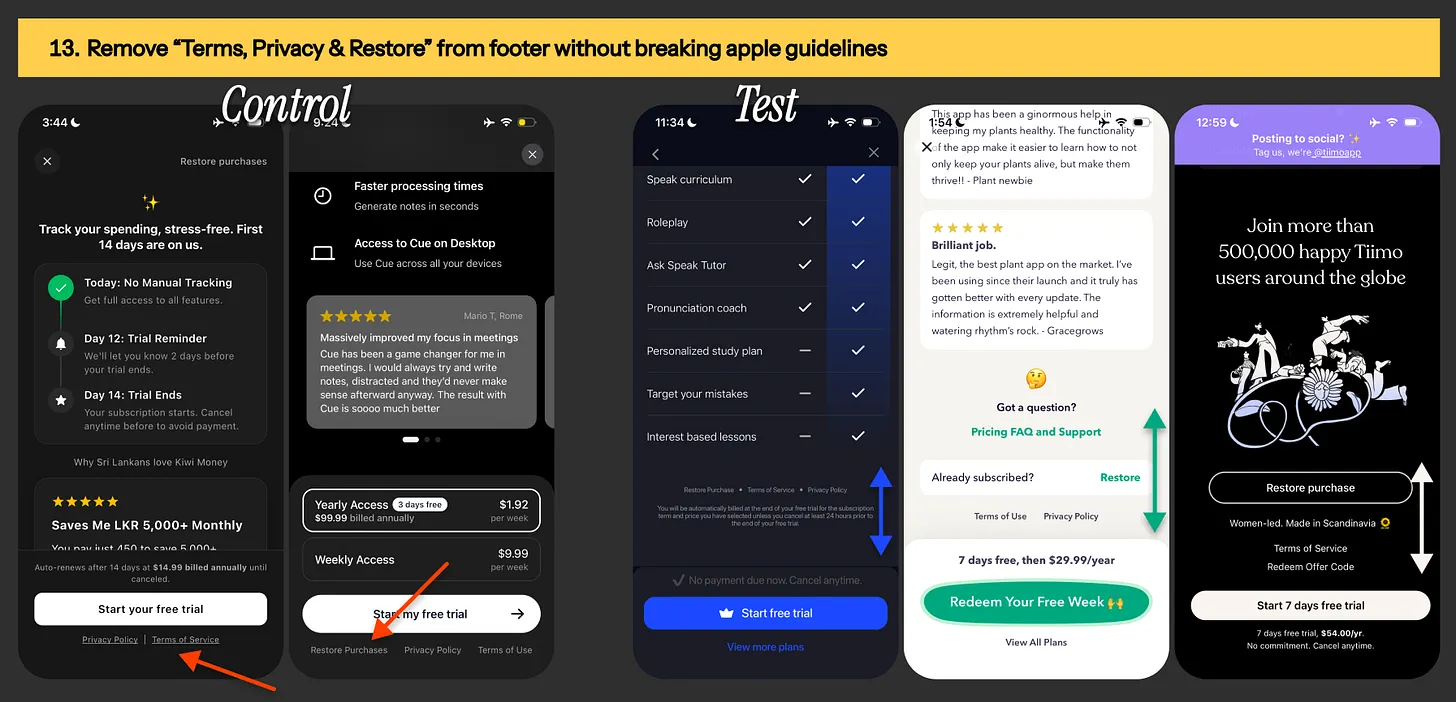
Image: Paywall CTA button from Mob, Waking up & Headway app

Experiment #13: Relocating “terms, privacy & restore purchase” links from paywall footer

Test variant examples from Speak, Greg & Tiimo app
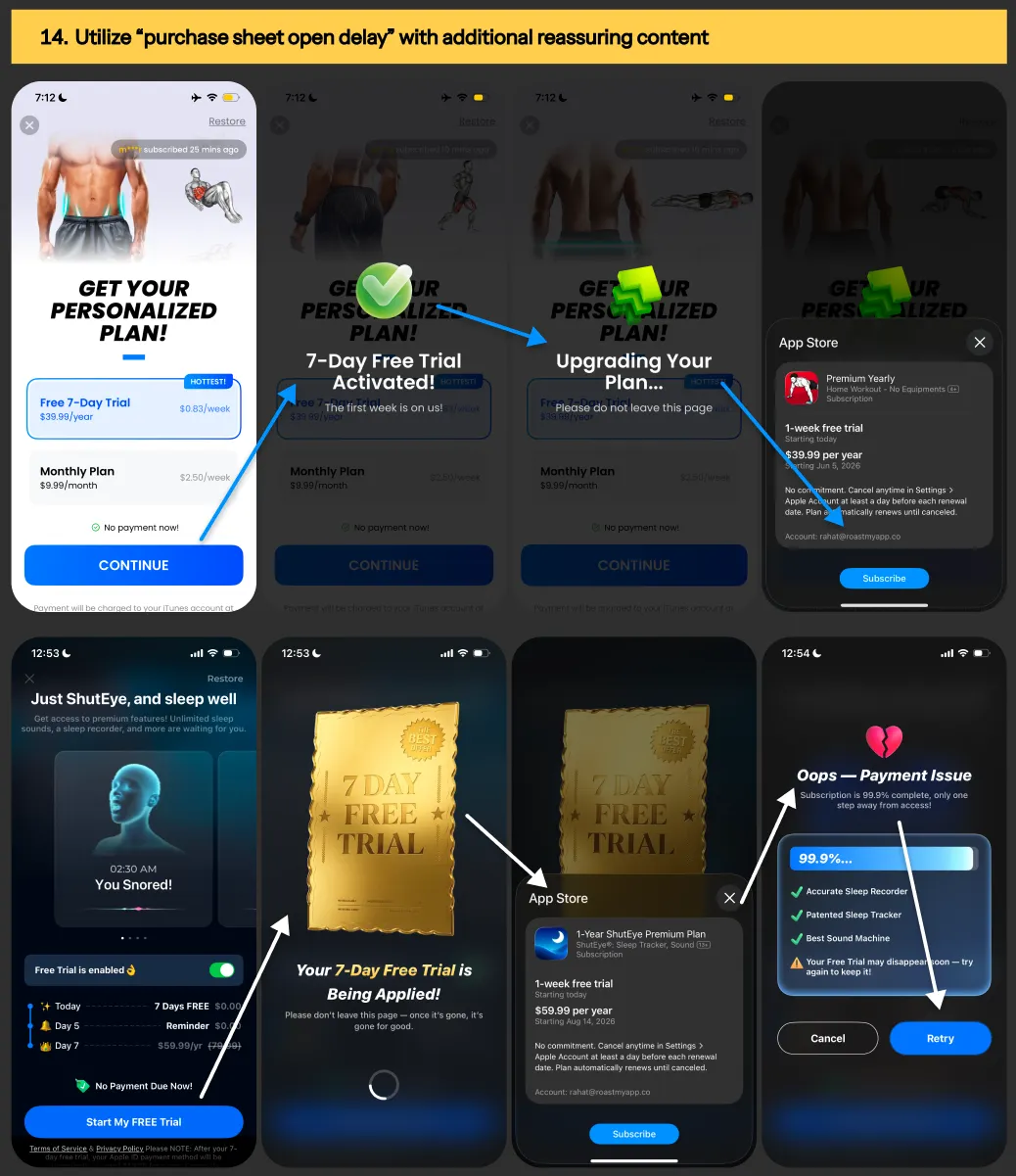
Image: Test variant examples from Speak, Greg & Tiimo app

Experiment #14: Utilize time delay during “in-app purchase sheet open” with additional reassuring content

Paywall examples from Shuteye & Home workout app
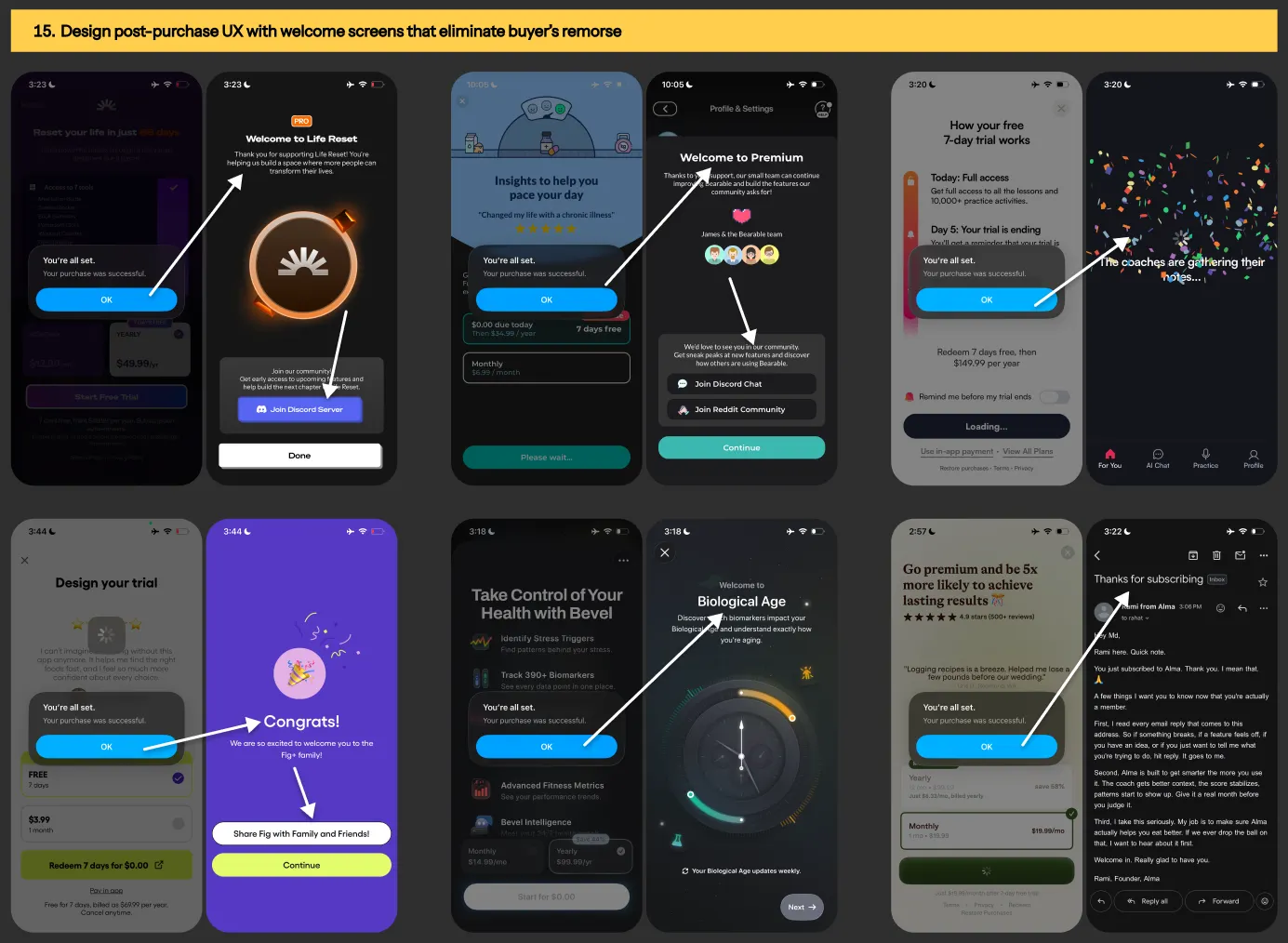
Image: Paywall examples from Shuteye & Home workout app

Experiment #15: Design post-purchase UX flow with screens that eliminate buyer’s remorse

Post-purchase UX design from Life Reset, Bearable, Fig Food Scanner, Bevel, BoldVoice & Alma app

Image: Post-purchase UX design from Life Reset, Bearable, Fig Food Scanner, Bevel, BoldVoice & Alma app
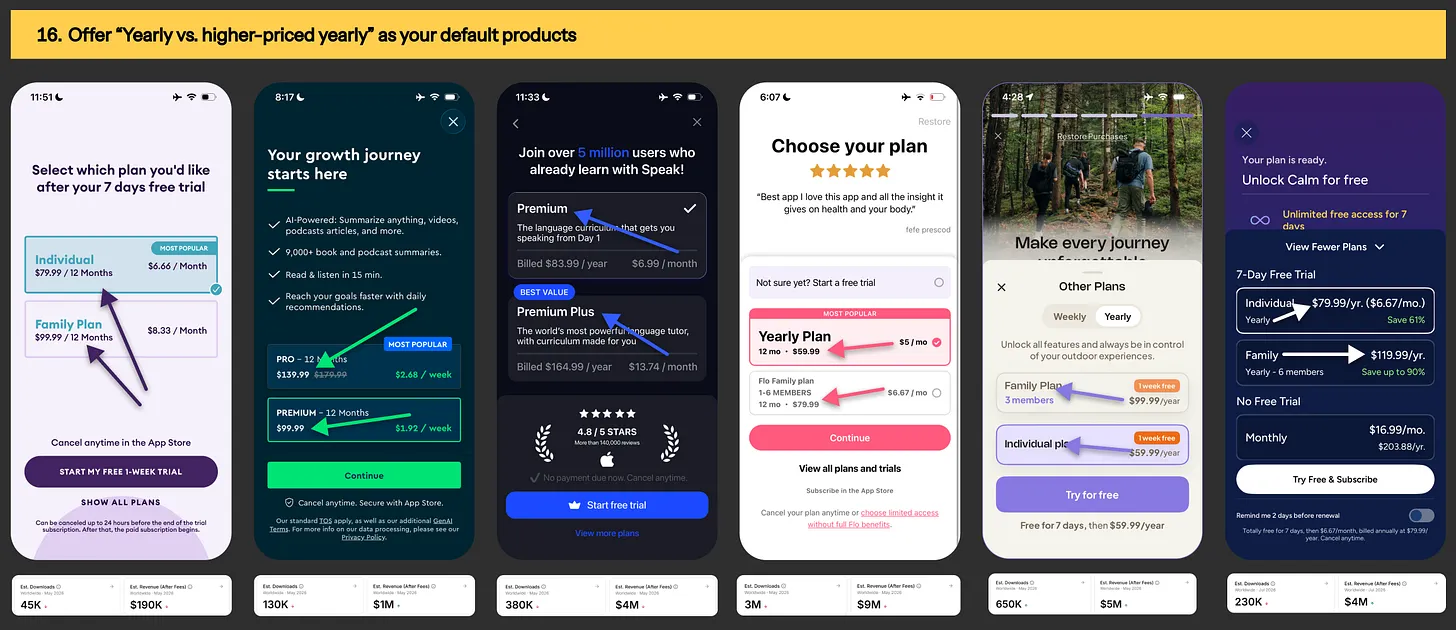
Experiment #16: Offer “yearly vs. higher-priced yearly” as your default subscription plans

Paywall offering example from Yuno, Blinkist, Calm & Komoot
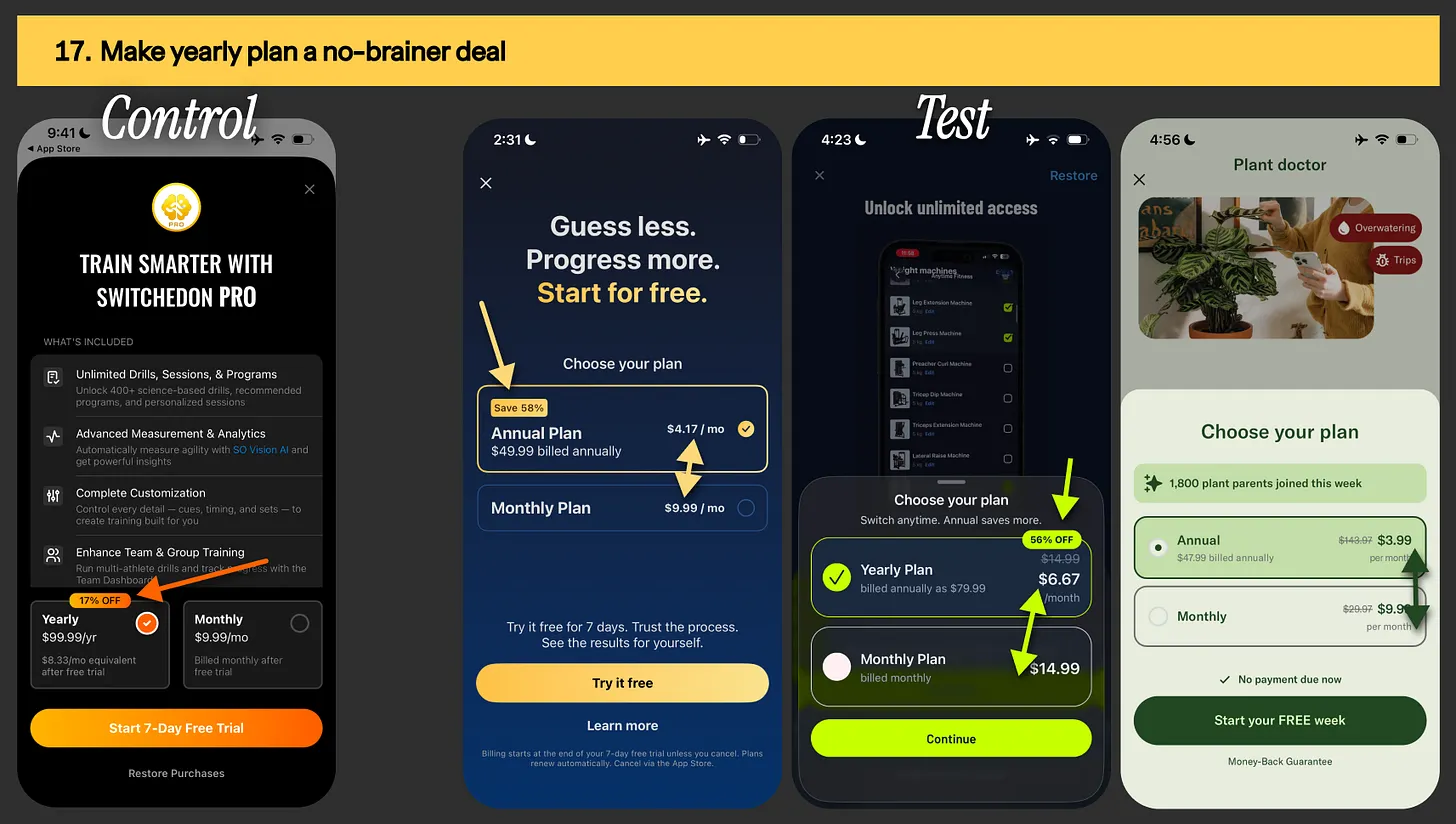
Image: Paywall offering example from Yuno, Blinkist, Calm & Komoot

Experiment #17: Present your highest-LTV plan [typically annual] as the no-brainer deal

Yearly-monthly pricing example from MyFitnessPal, Gravl, Planta app
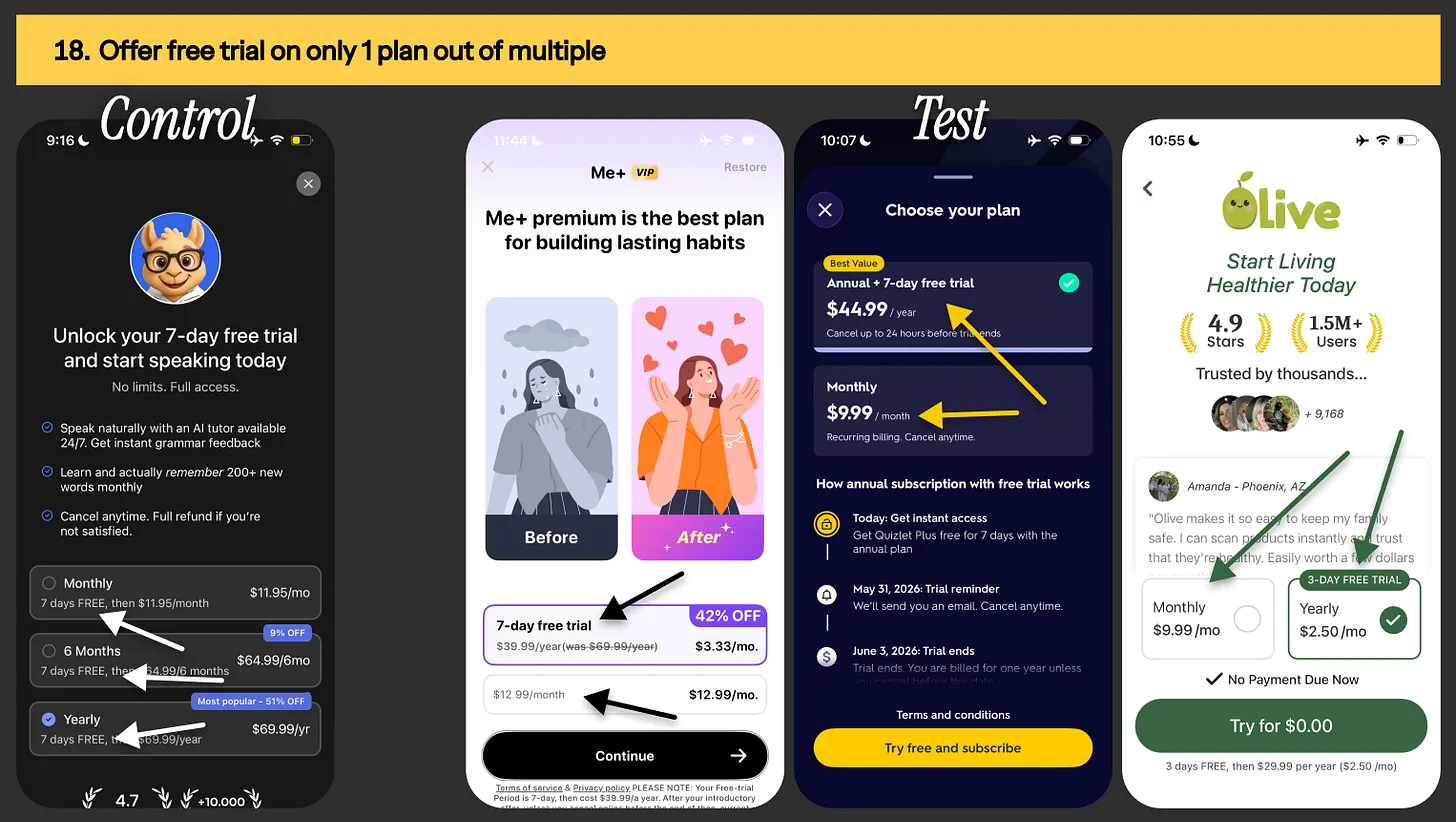
Image: Yearly-monthly pricing example from MyFitnessPal, Gravl, Planta app

Experiment #18: Offer free trial on only 1 plan out of multiple

Pricing & packaging example from Me+, Quizlet & Olive app
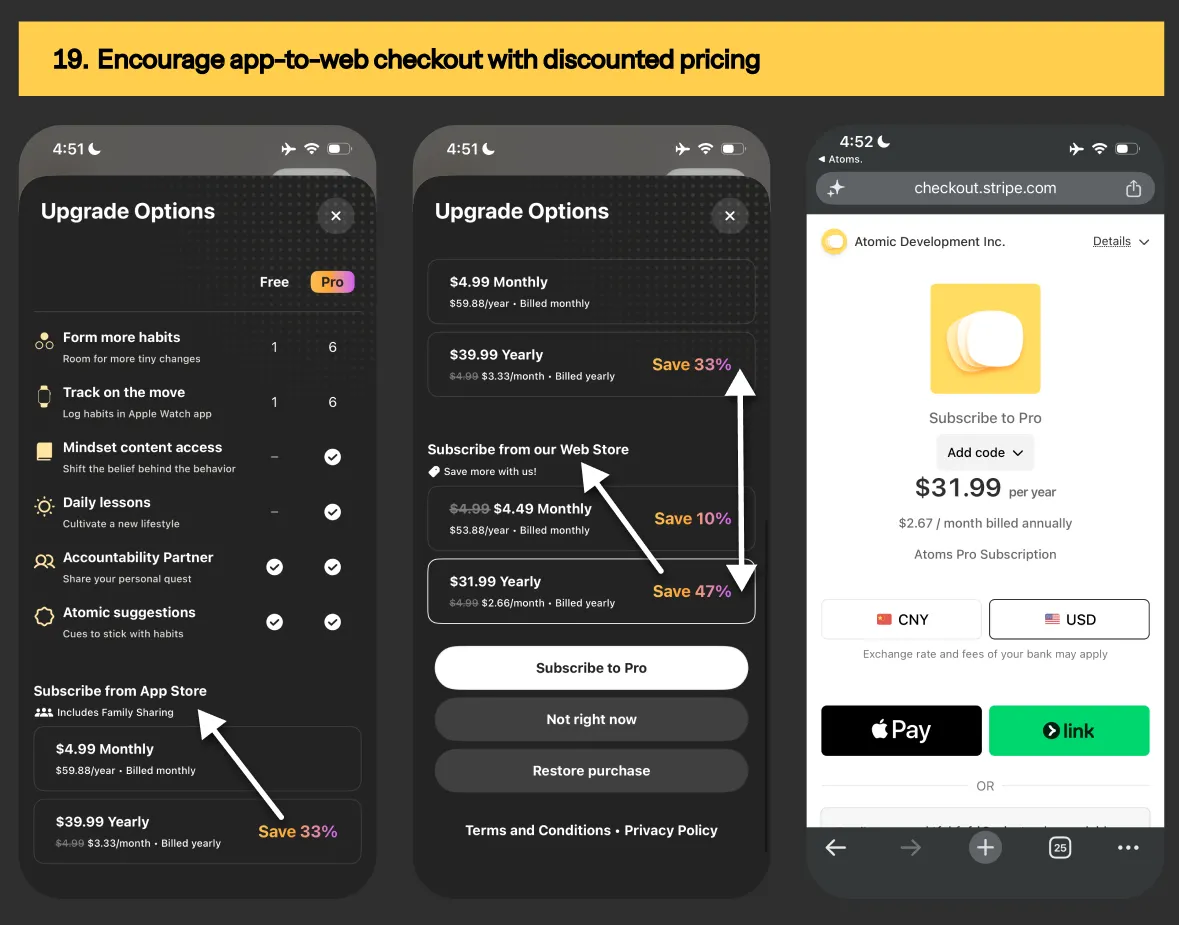
Image: Pricing & packaging example from Me+, Quizlet & Olive app

Experiment #19: Nudge towards app-to-web checkout with higher discounted pricings

App2web pricing from Atoms habit tracker app
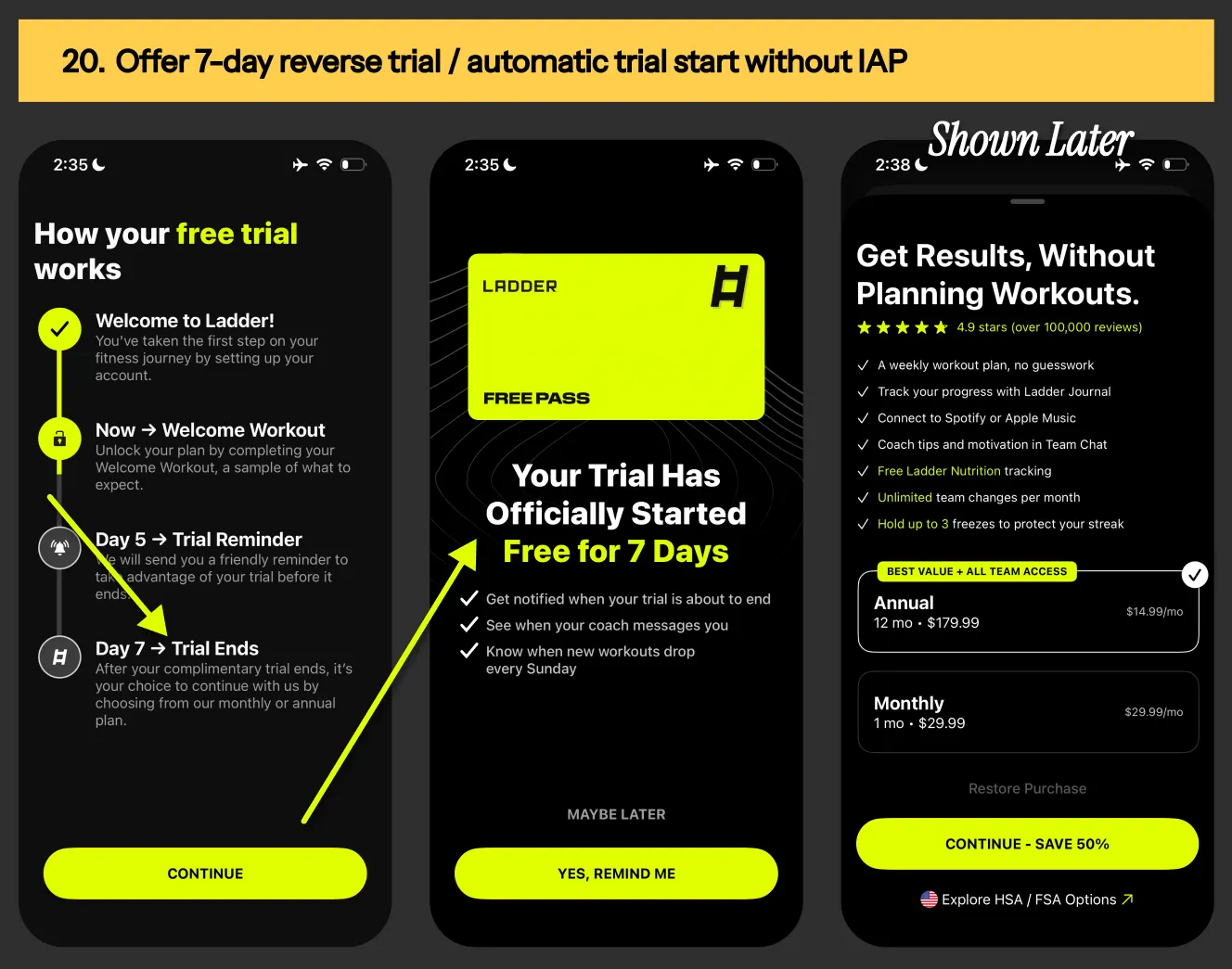
Image: App2web pricing from Atoms habit tracker app

Experiment #20: Offer 7-day free reverse trial that starts automatically without IAP

 Reverse trial example for Ladder fitnerss app
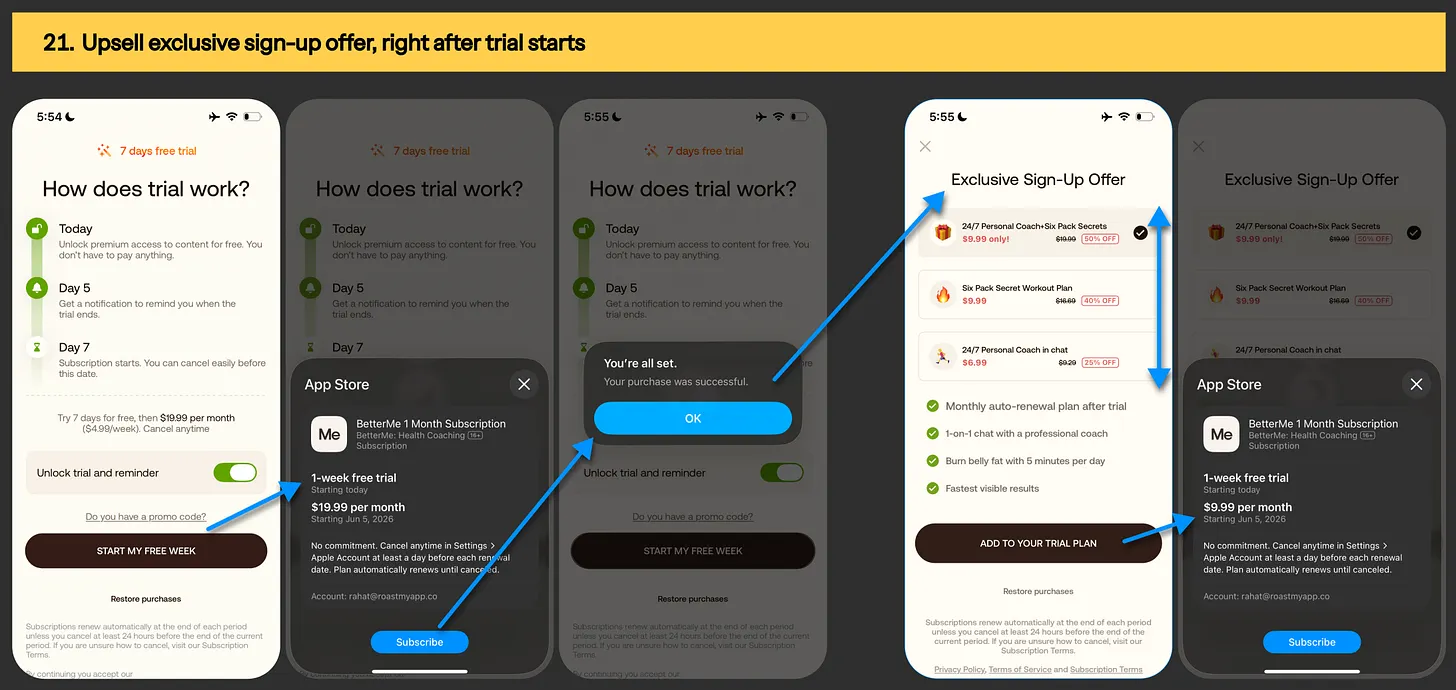
Image: Reverse trial example for Ladder fitnerss app

Experiment #21: Facilitate multiple purchases with upsell offers, right after trial activation

Paywall upsell offer example from BetterMe app

Image: Upsell offer example from BetterMe app
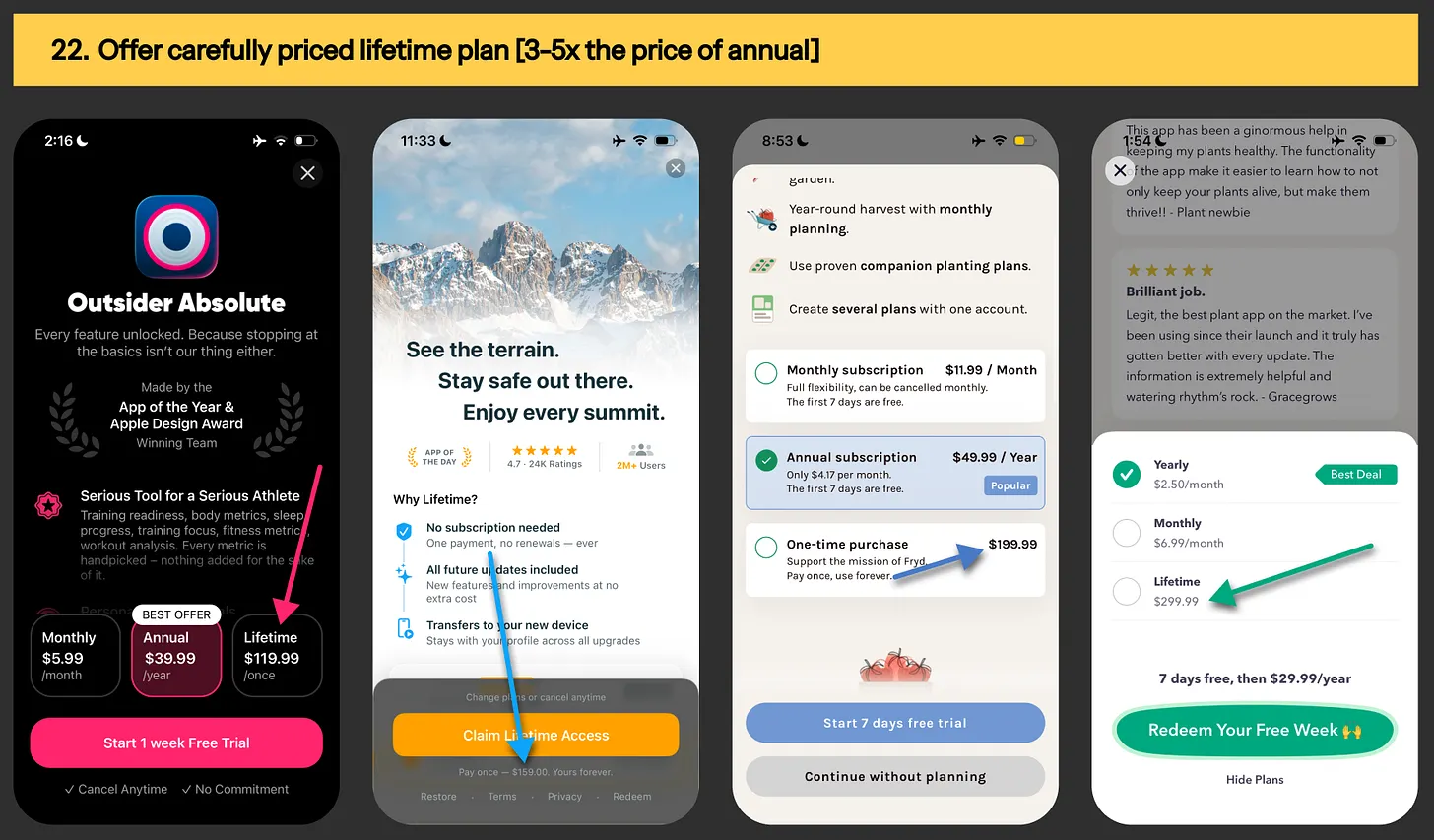
Experiment #22: Offer carefully priced lifetime plan [typically 3-10x the price of annual plan]

 Lifetime pricing example from Outsider, Fryd & Greg app
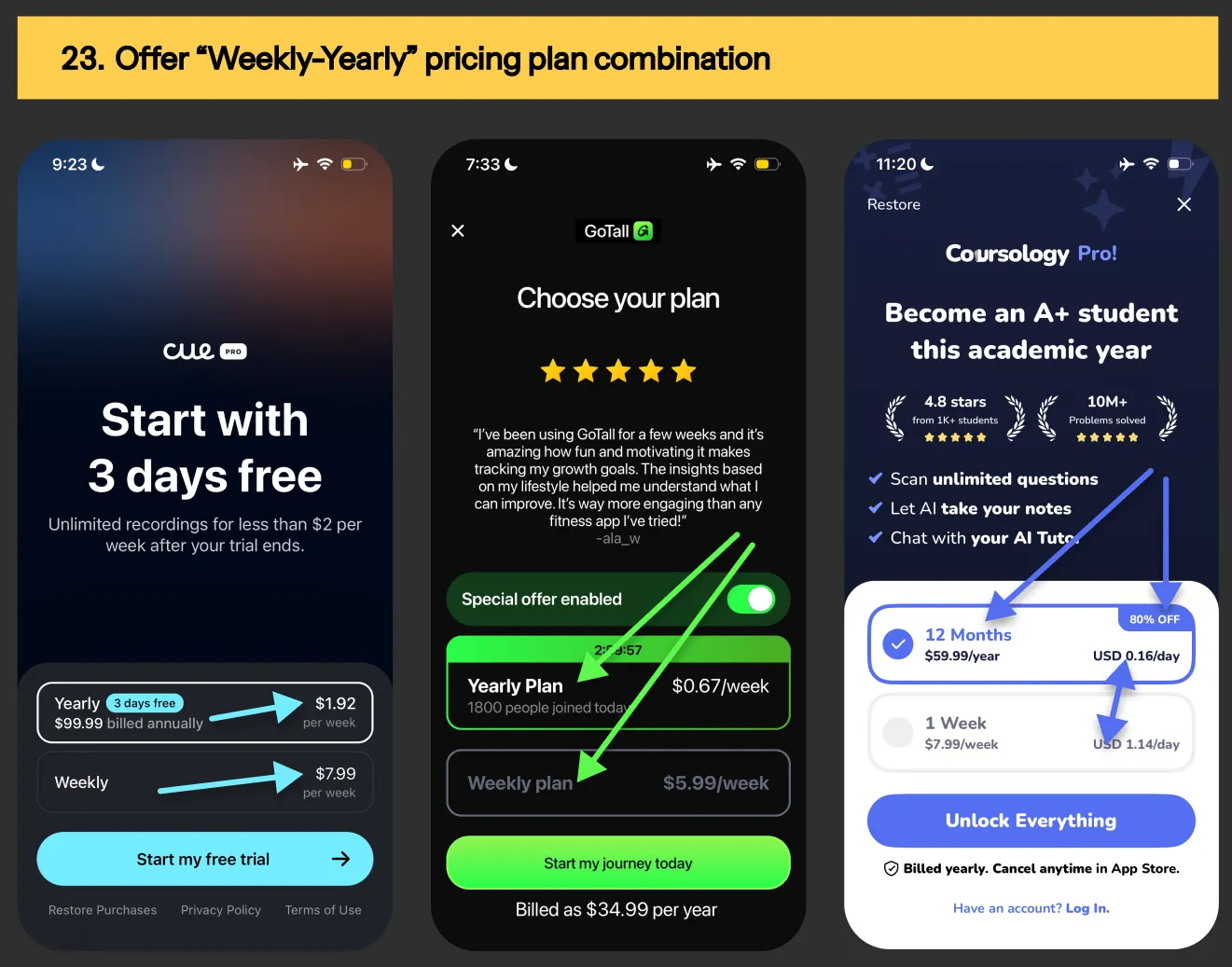
Image: Lifetime pricing example from Outsider, Fryd & Greg app

Experiment #23: Anchor pricing with “weekly-yearly” subscription plan combination

Image: Weekly-yearly pricing combo from Cue NoteTaker, GoTall & Coursology app
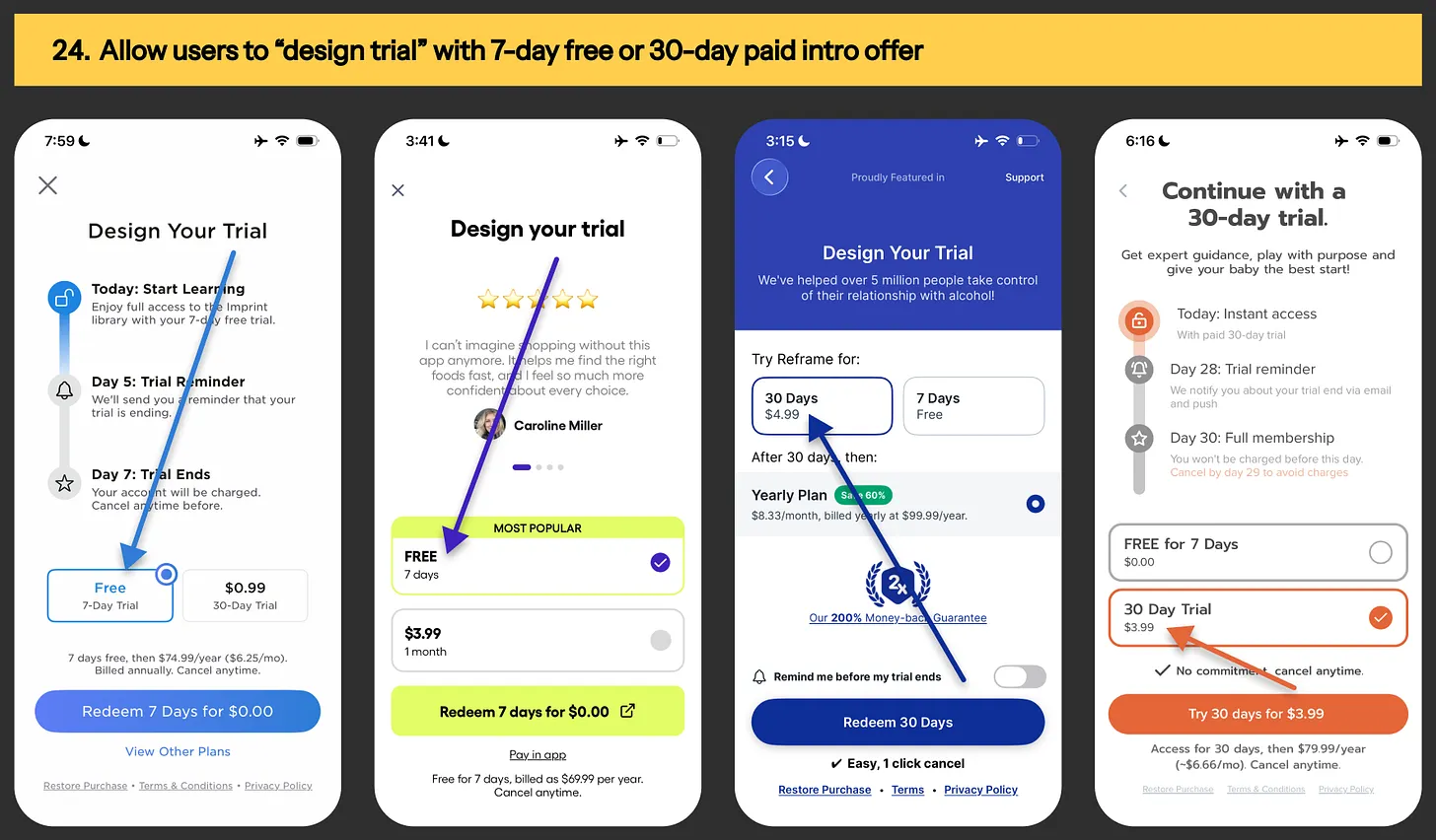
Image: Weekly-yearly pricing combo from Cue NoteTaker, GoTall & Coursology app

Experiment #24: Allow users to “design trial” with 7-day free offer or 30-day paid intro offer

 Design your trial paywall example from Imprint, Fig, Reframe & Kinedu app
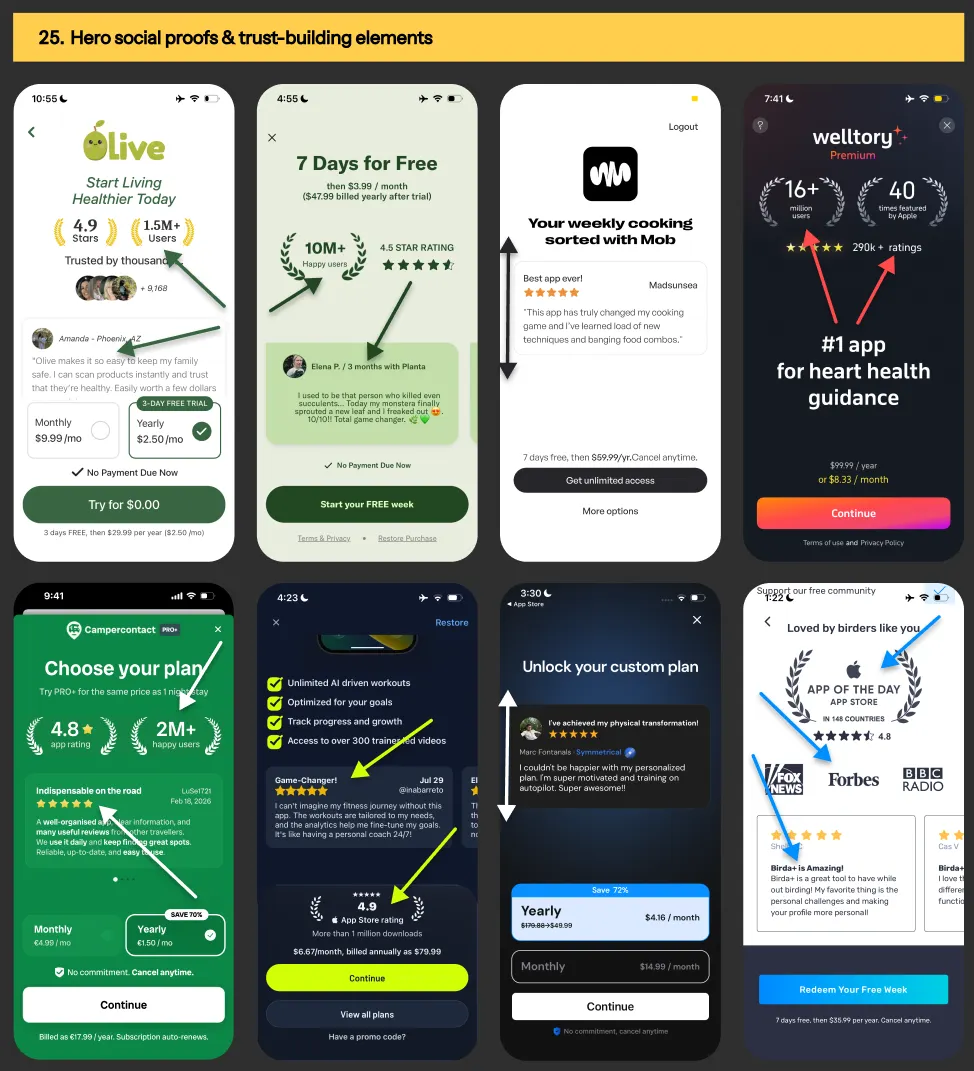
Image: Design your trial paywall example from Imprint, Fig, Reframe & Kinedu app

Experiment #25: Paywall screen with only social proofs & trust-building elements

Paywall design examples from Olive, Planta, Mob, Welltory, Campercontact, Gravl, Symmetry & Birda app
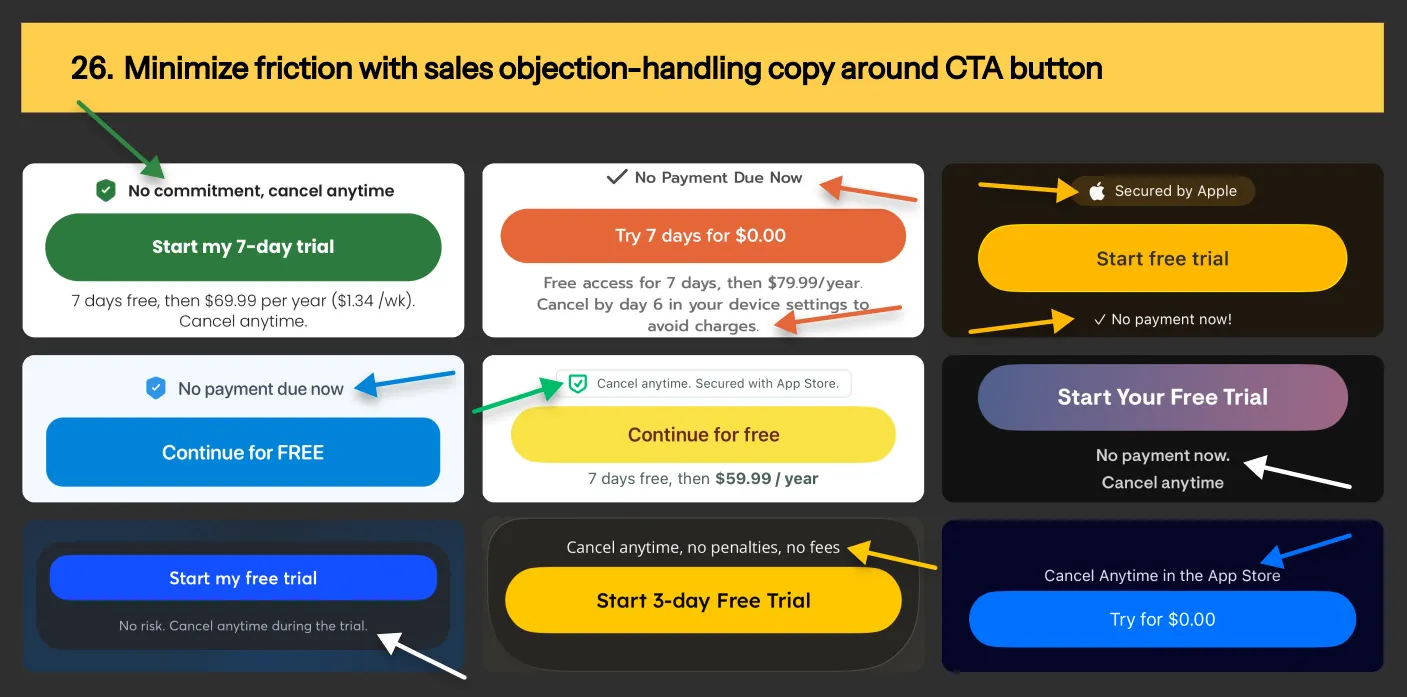
Image: Paywall design examples from Olive, Planta, Mob, Welltory, Campercontact, Gravl, Symmetry & Birda app

Experiment #26: Minimize friction with sales objection-handling copy around CTA button

 9 paywall copy examples for objection-handling
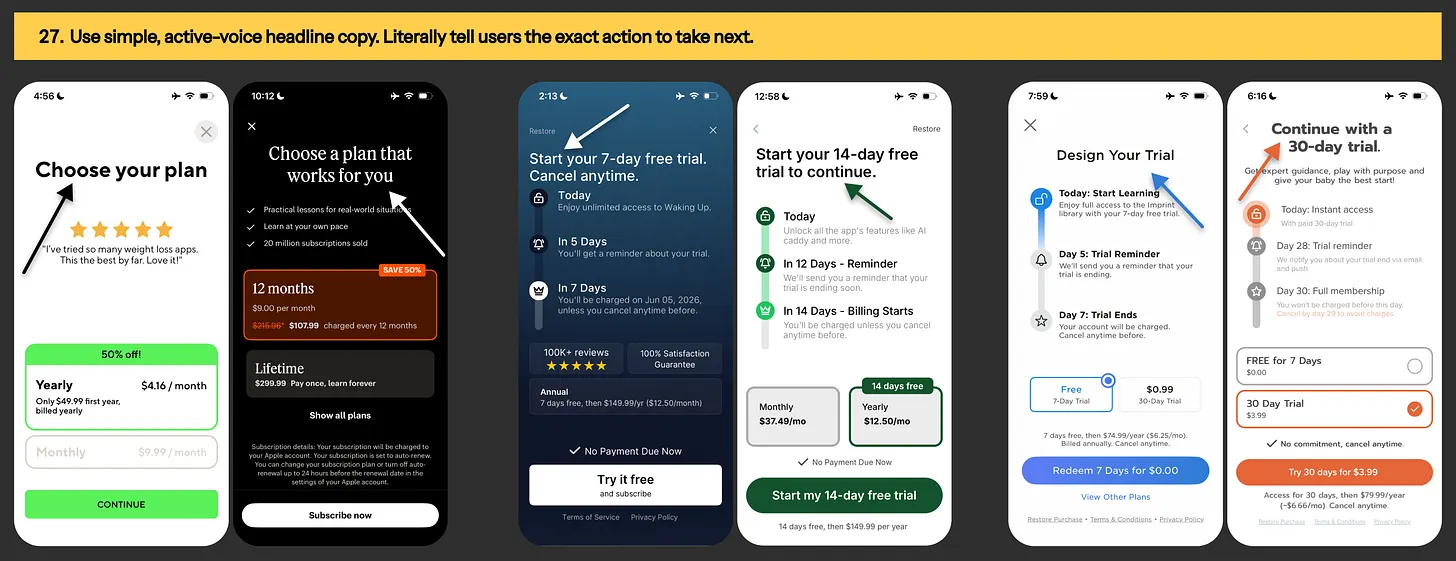
Image: 9 paywall copy examples for objection-handling

Experiment #27: Use simple, active-voice headline copy

Paywall headline examples from Lifesum, Babbel, Waking Up, Scratch AI, Imprint & Kinedu app

Image: Paywall headline examples from Lifesum, Babbel, Waking Up, Scratch AI, Imprint & Kinedu app
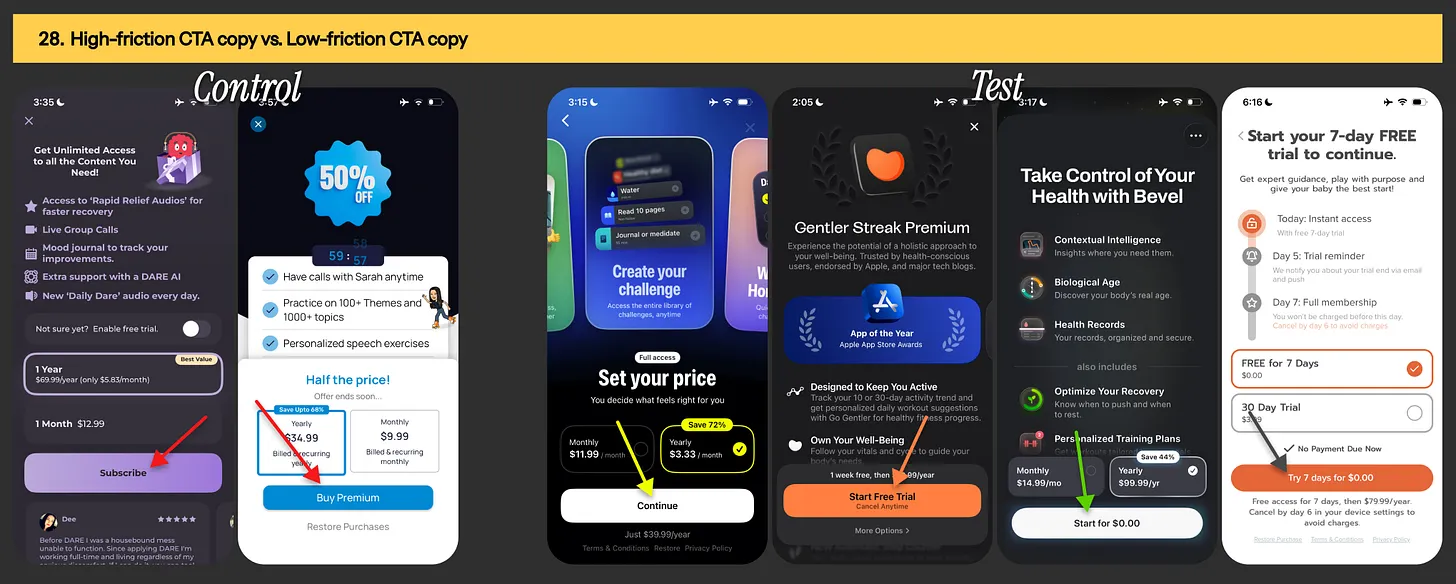
Experiment #28: Using high-friction CTA button copy vs. low-friction CTA button copy

 Paywall button copy example from BeHard, Gentler streak, Bevel & Kinedu app
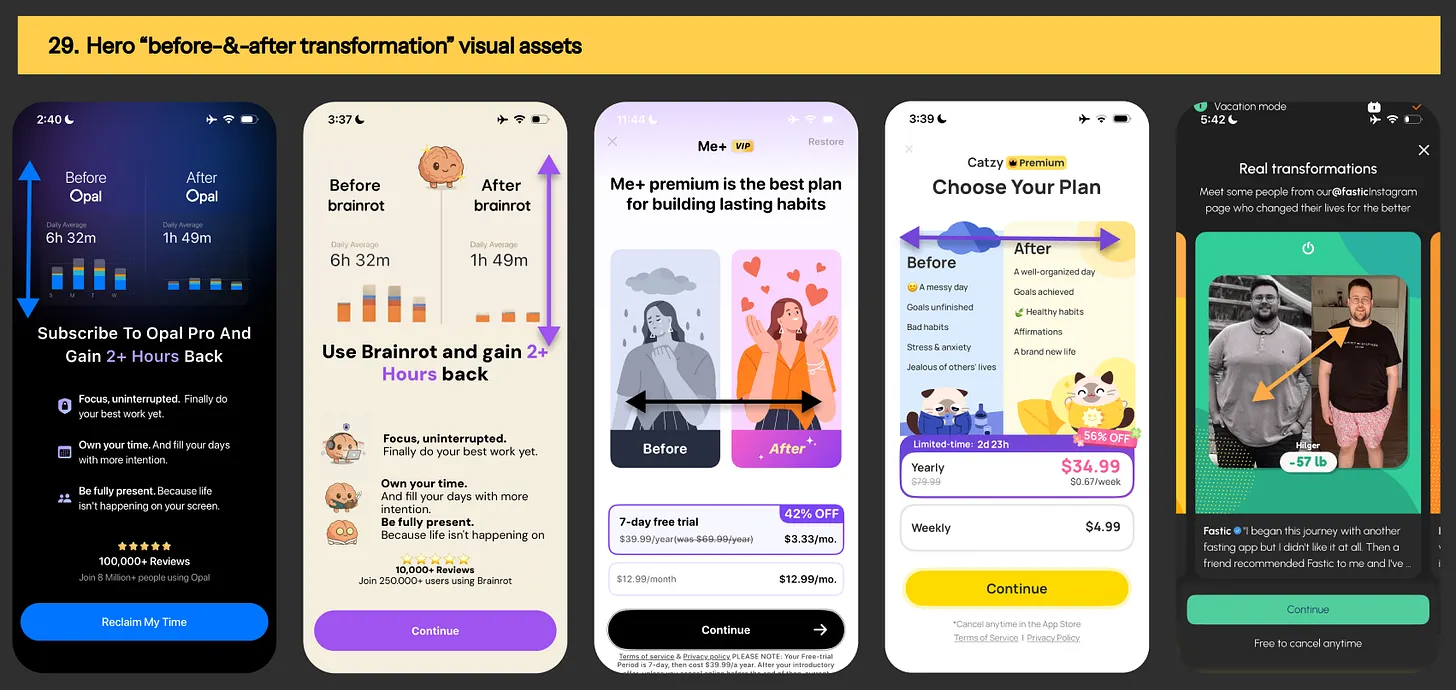
Image: Paywall button copy example from BeHard, Gentler streak, Bevel & Kinedu app

Experiment #29: Hero “before-&-after transformation” visual assets

 Paywall hero visual asset example from Opal, Brainrot, Me+, Catzy & Fastic app
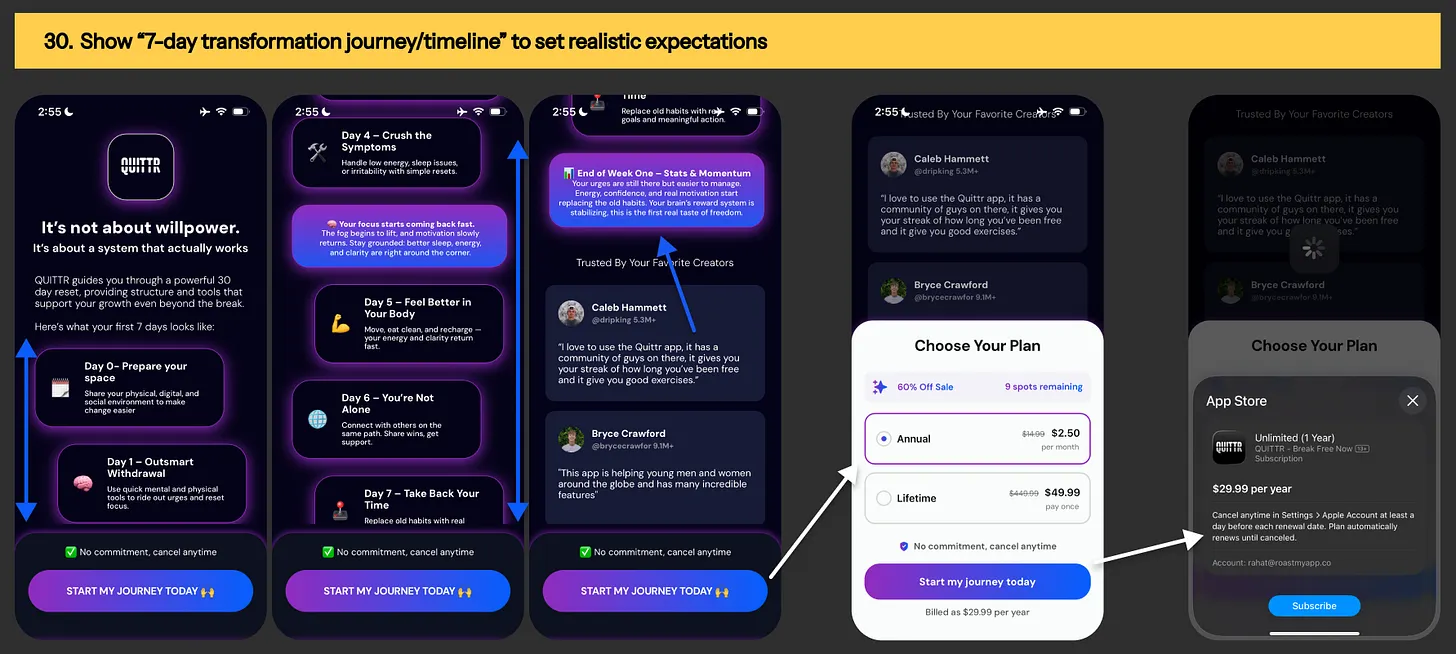
Image: Paywall hero visual asset example from Opal, Brainrot, Me+, Catzy & Fastic app

Experiment #30: Show “7-day transformation journey/timeline” to set realistic expectations

Paywall design pattern from Quittr app
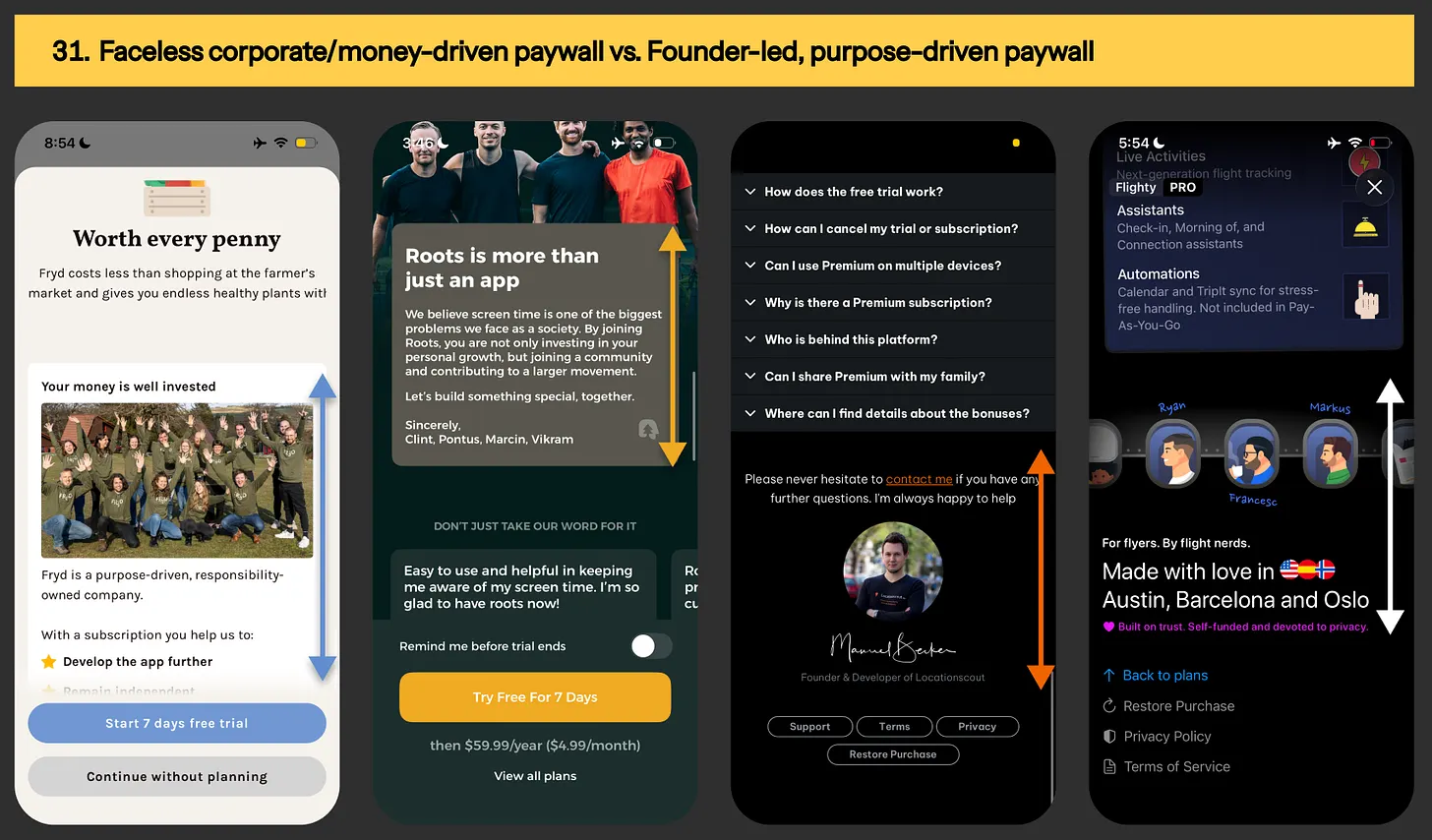
Image: Paywall design pattern from Quittr app

Experiment #31: Faceless corporate/money-driven paywall vs. Founder-led, purpose-driven paywall

 Paywall content example from Fryd, Roots, LocationScout & Flighty app
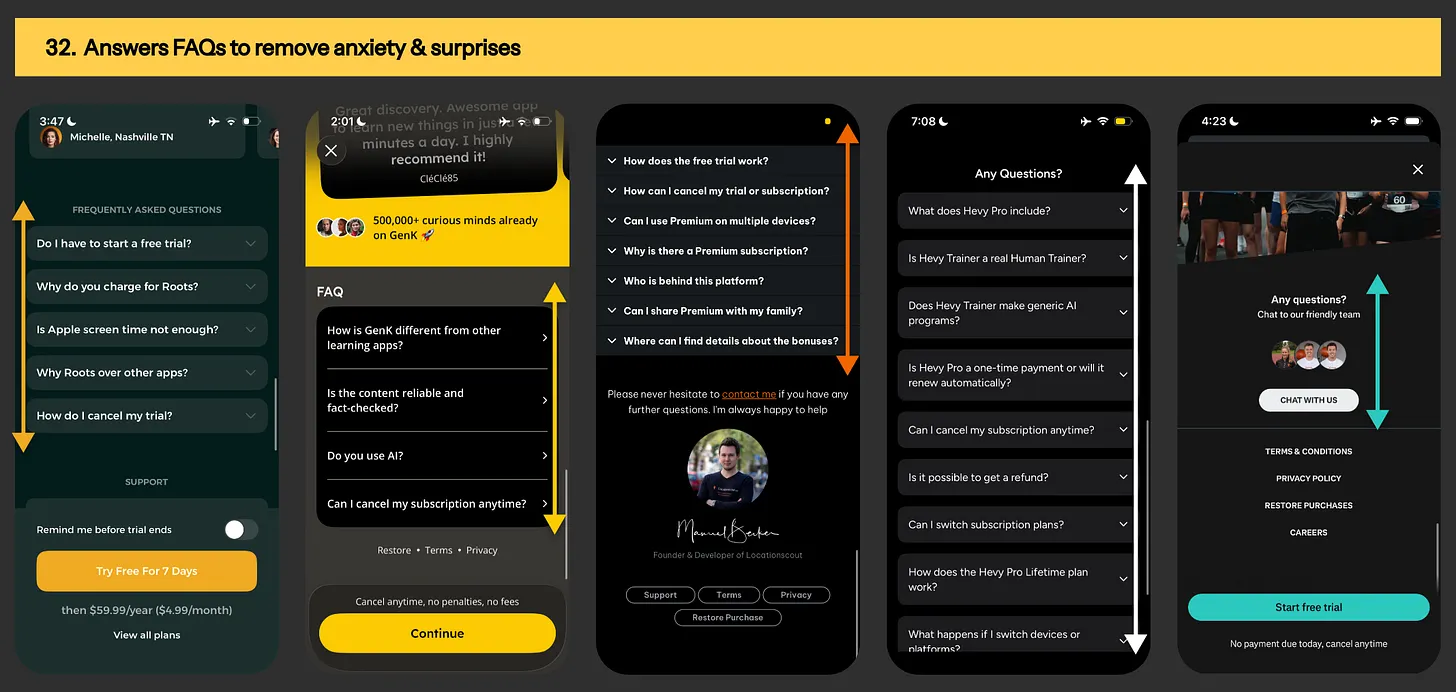
Image: Paywall content example from Fryd, Roots, LocationScout & Flighty app

Experiment #32: Include “FAQ section” as your last resort to remove buyer anxiety & billing surprises

FAQ section from Roots, GenK, LocationScout, Hevy & Runna app
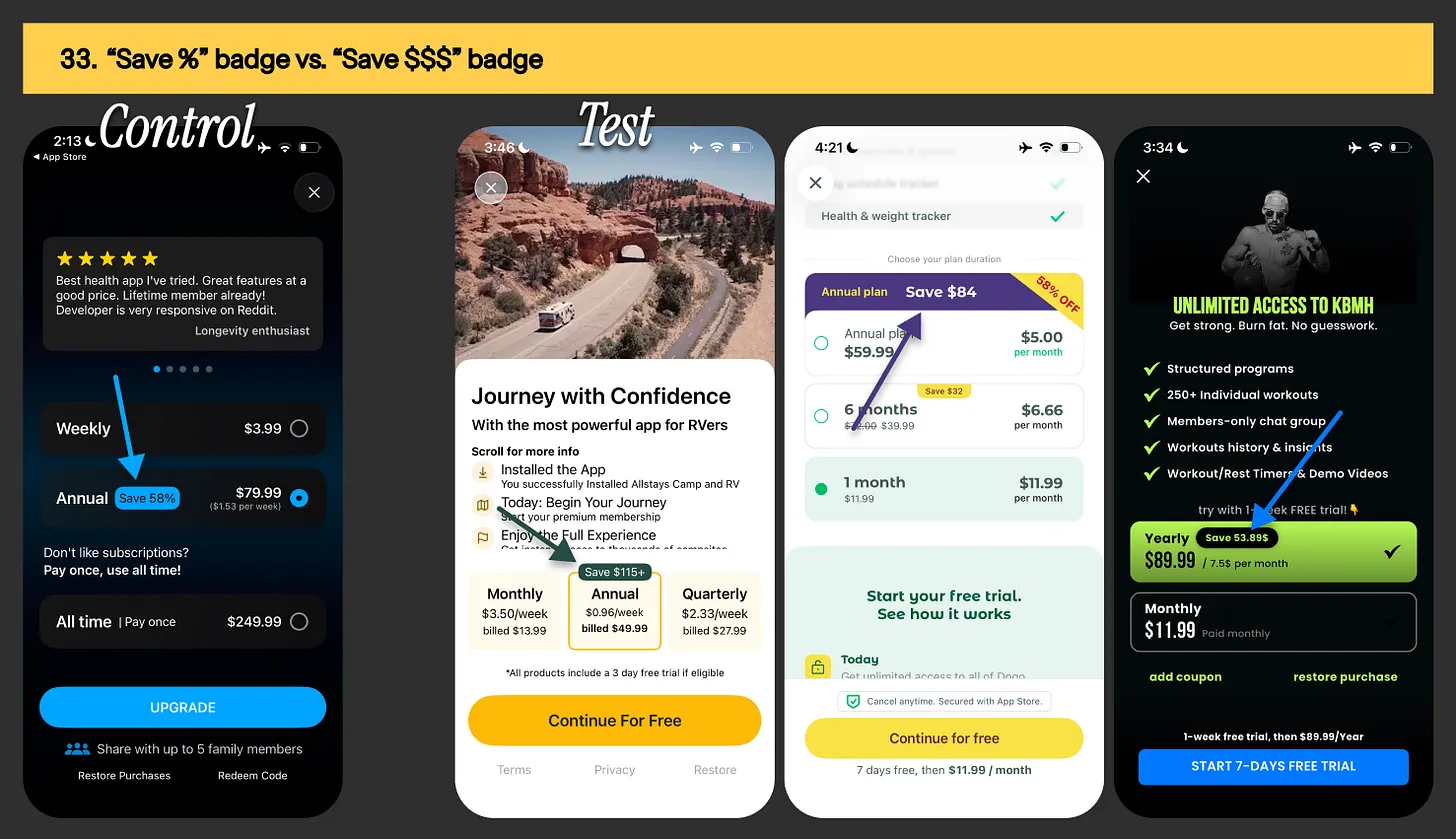
Image: FAQ section from Roots, GenK, LocationScout, Hevy & Runna

Experiment #33: Displaying “save %” badge vs. “save $$$” badge

 Save badge examples from Livity, AllStays, Dogo & KBMH Kettlebell training app
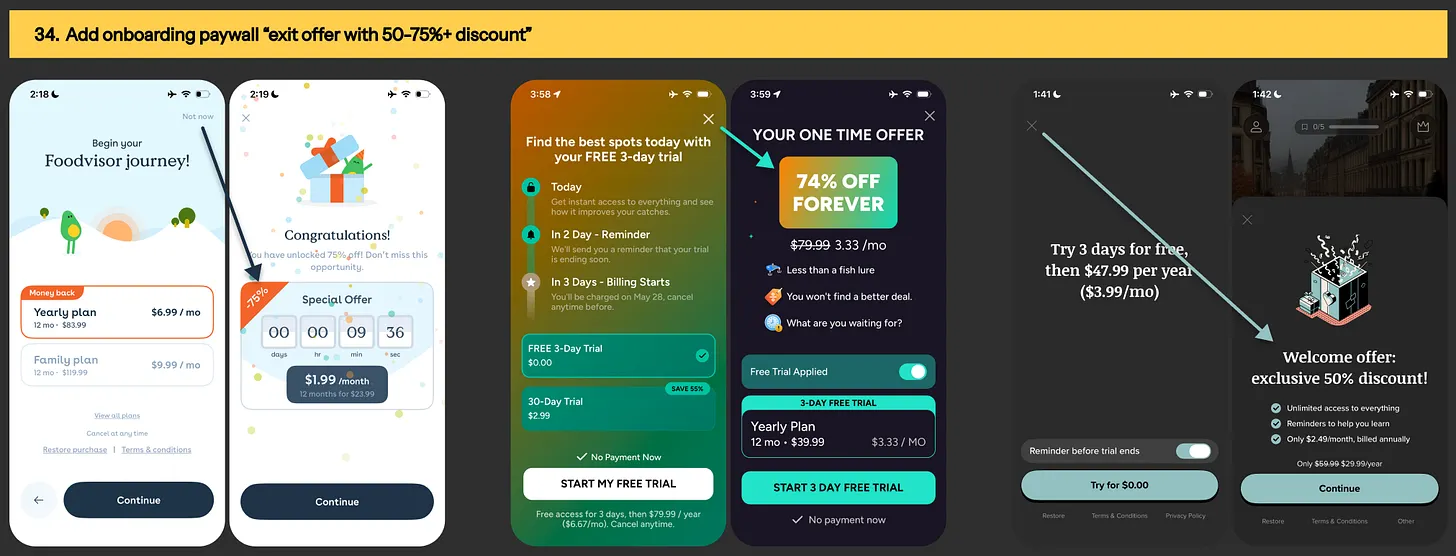
Image: Save badge examples from Livity, AllStays, Dogo & KBMH Kettlebell training app

Experiment #34: Add “exit offer” with 50-75%+ discount to your onboarding paywall

 Onboaring paywall exit offer example from FoodVisor, Fish AI & Vocabulary app
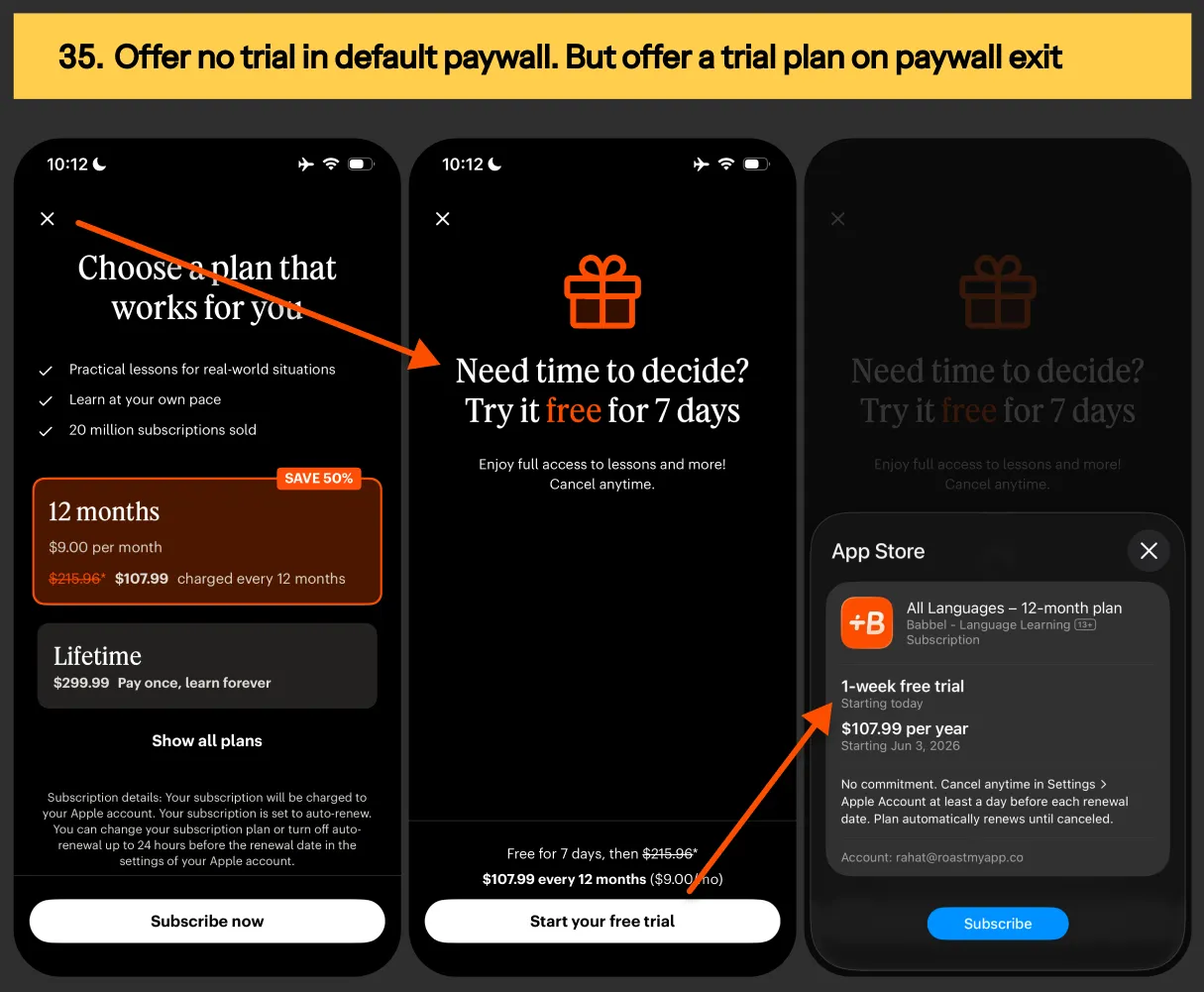
Image: Onboaring paywall exit offer example from FoodVisor, Fish AI & Vocabulary app

Experiment #35: Offer no trial in default paywall products. But offer a free trial on paywall exit

Paywall exit offer example from Babbel language app
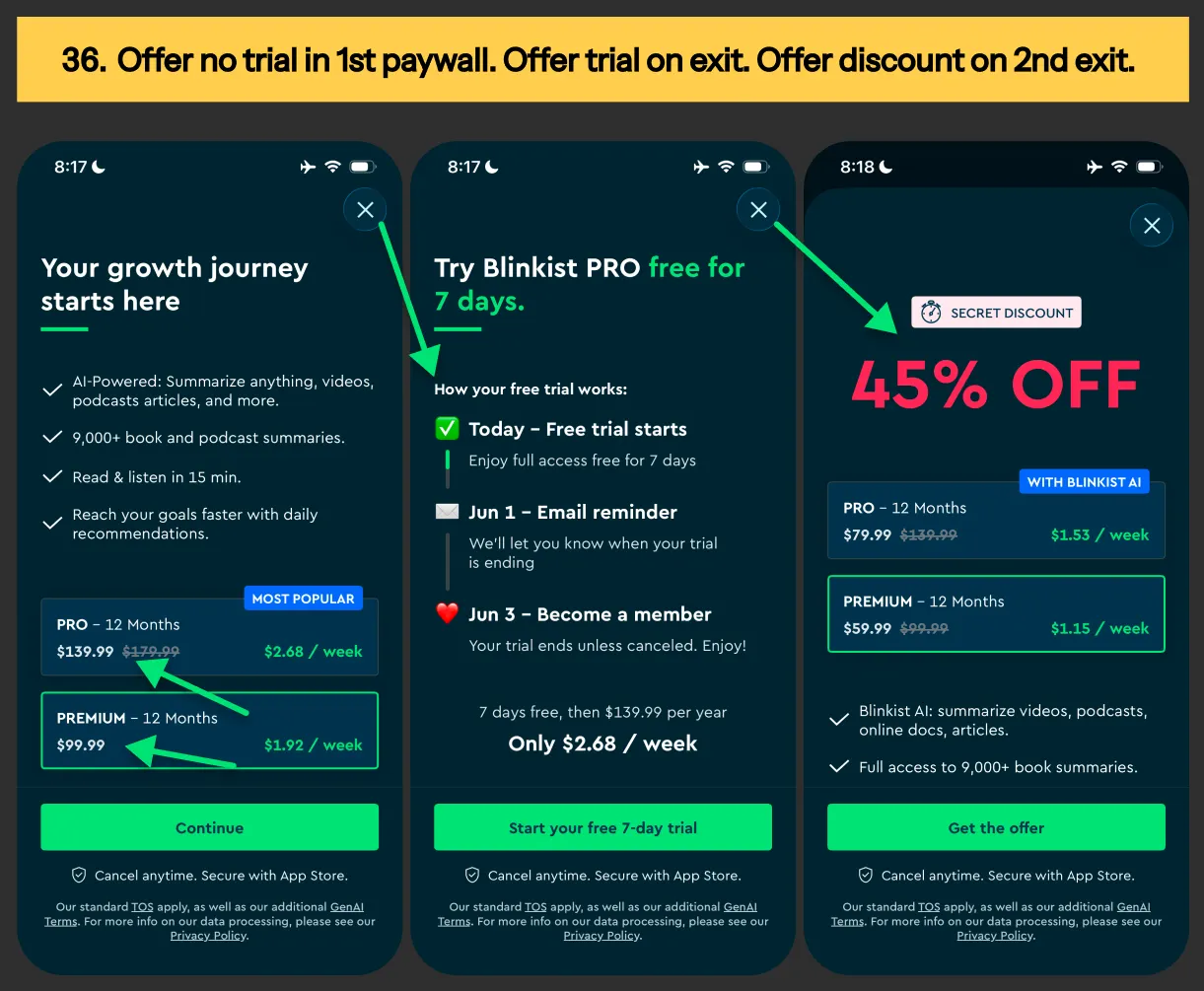
Image: Paywall exit offer example from Babbel language app

Experiment #36: Offer no trial in 1st paywall → Offer trial on 1st exit → Offer discount on 2nd exit

Paywall exit offer setup from Blinkist app
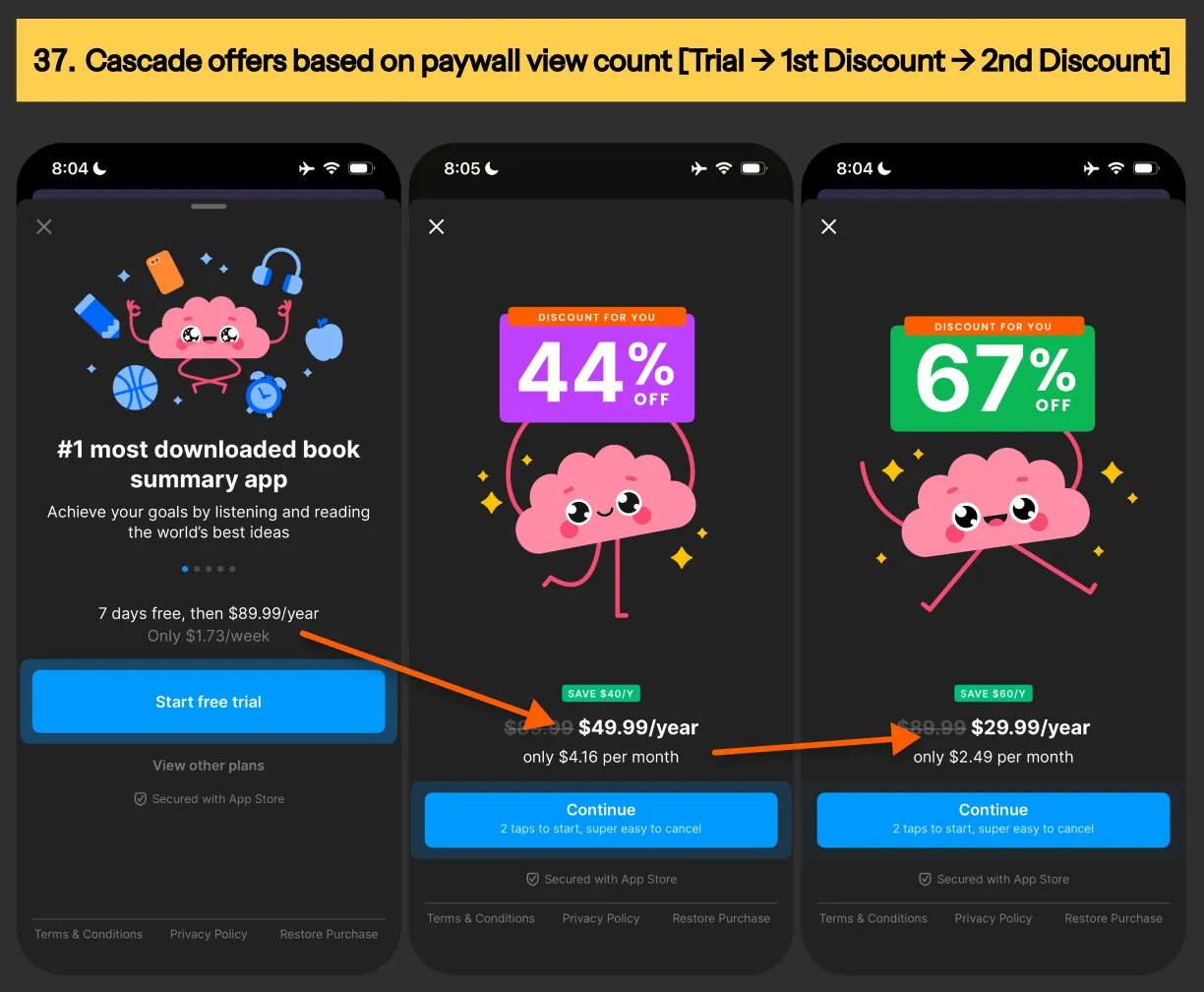
Image: Paywall exit offer setup from Blinkist app

Experiment #37: Cascade offering based on paywall view count [free trial → 1st discount → 2nd discount]

Paywall promotion offers example from Headway app
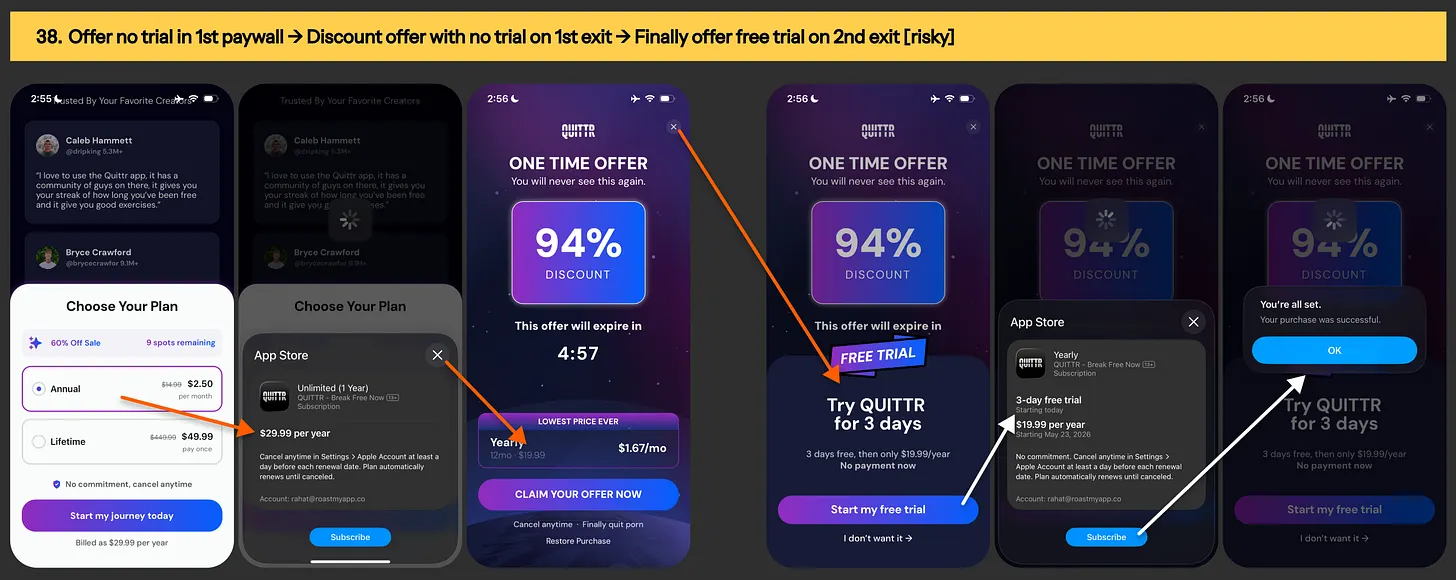
Image: Paywall promotion offers example from Headway app

Experiment #38: Offer no trial in default paywall → Offer discount with direct purchase on 1st exit → Offer discount with free trial on 2nd exit [risky]

Paywall exit offer setup from Quittr app
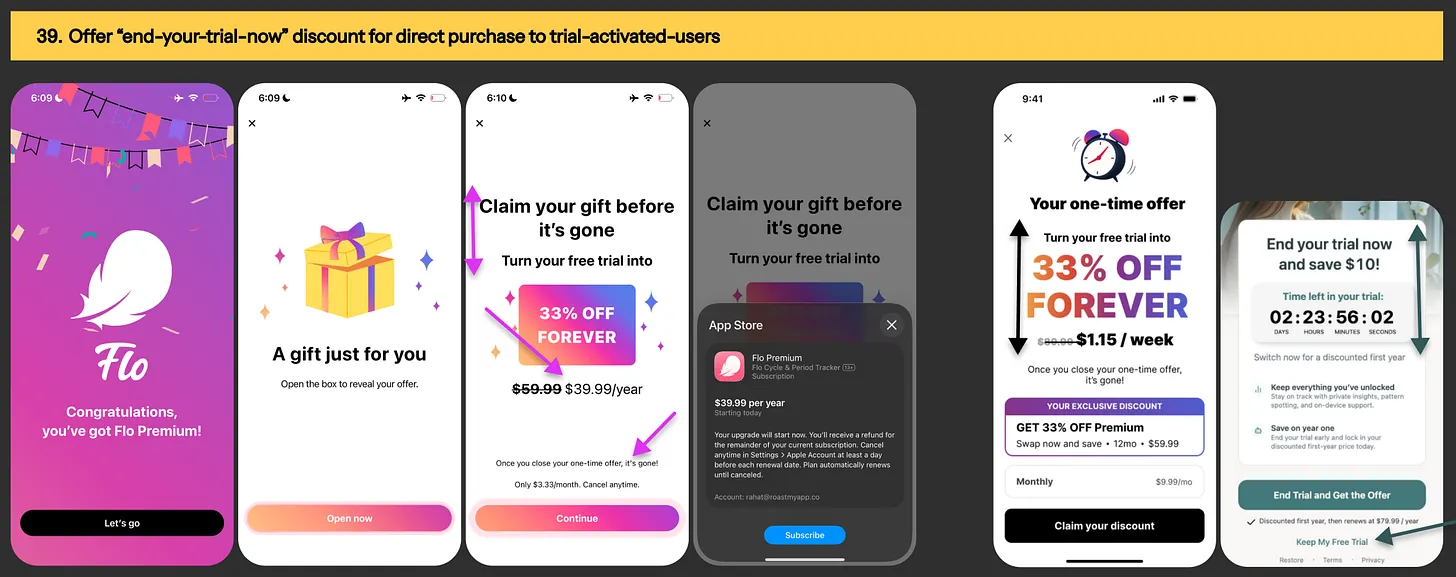
Image: Paywall exit offer setup from Quittr app

Experiment #39: Offer “end-your-trial-now” discount for direct purchase to trial-activated-users

 End-your-trial-now / swap-your-trial offer examples
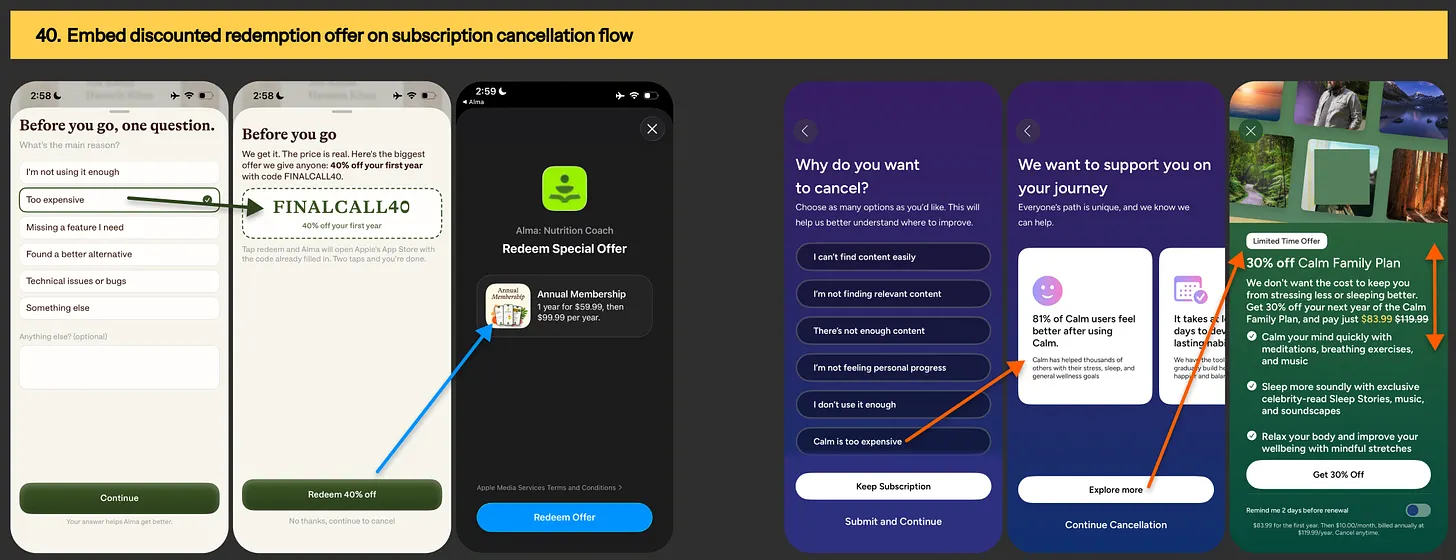
Image: End-your-trial-now / swap-your-trial offer examples

Experiment #40: Embed discounted redemption offer on subscription cancellation flow

 Promotion offer in subscription cancellation flow
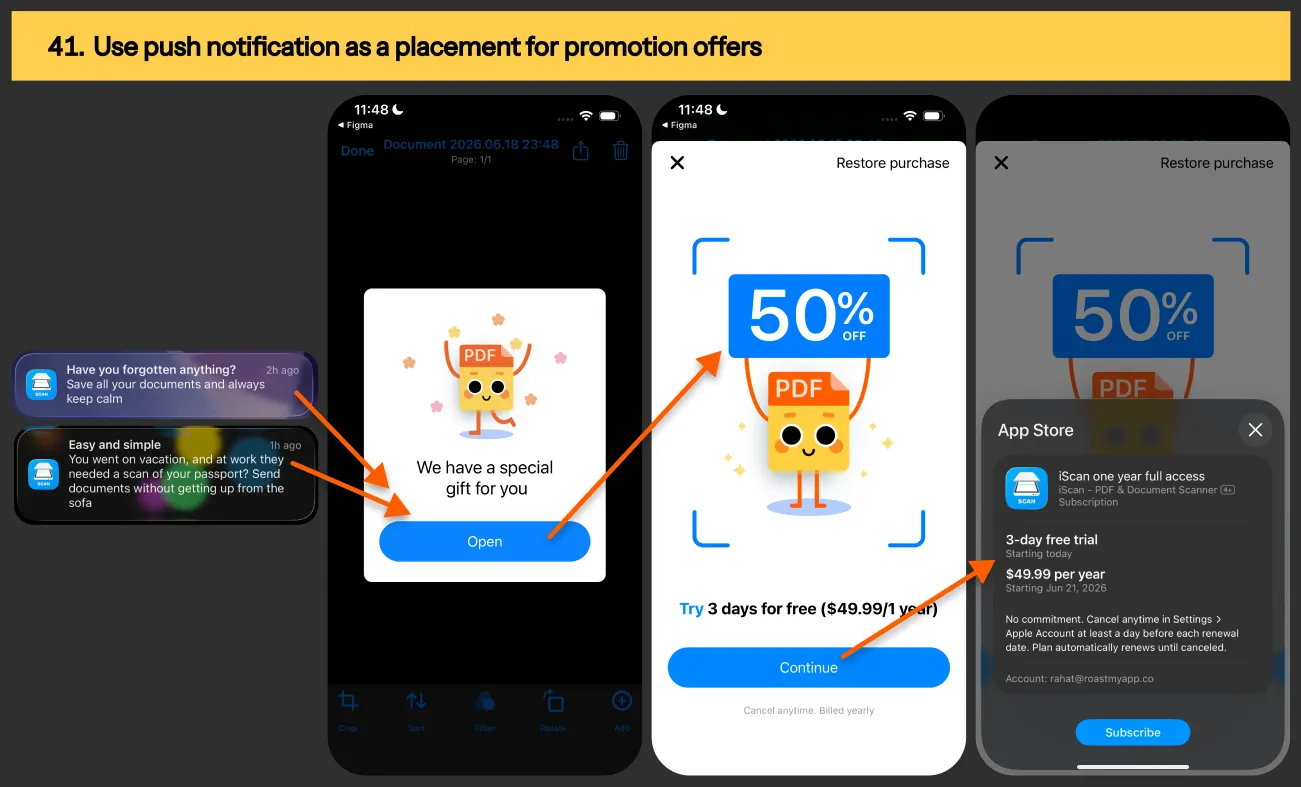
Image: Promotion offer in subscription cancellation flow

Experiment #41: Use push notification as a placement for promotion offers

Push notification placement for promotion offer
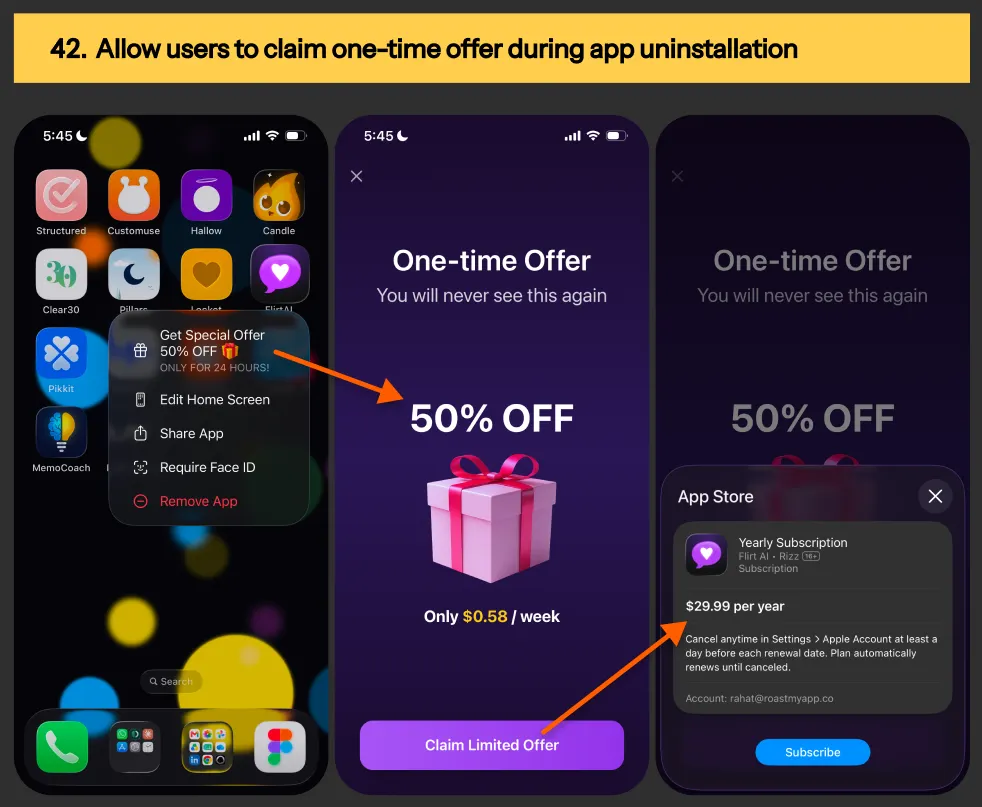
Image: Push notification placement for promotion offer

Experiment #42: Allow users to claim one-time offer during app uninstallation

Promotion offer example during app uninstallation
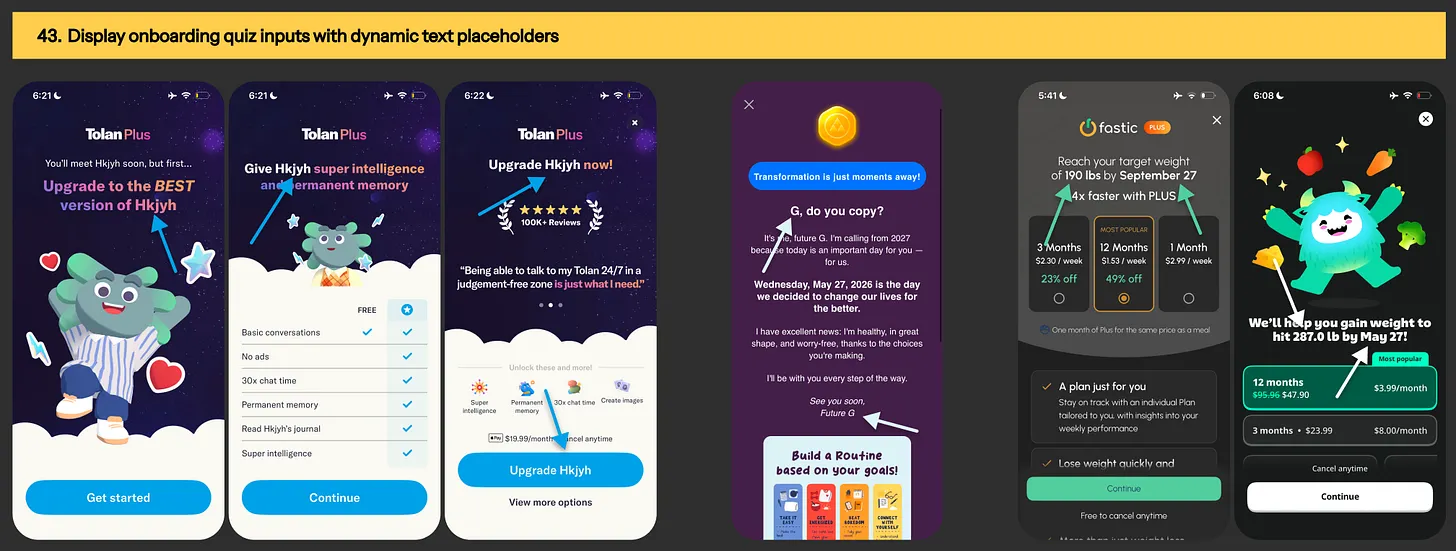
Image: Promotion offer example during app uninstallation

Experiment #43: Display onboarding quiz inputs with dynamic text placeholders

Paywall personalization using onboarding quiz inputs
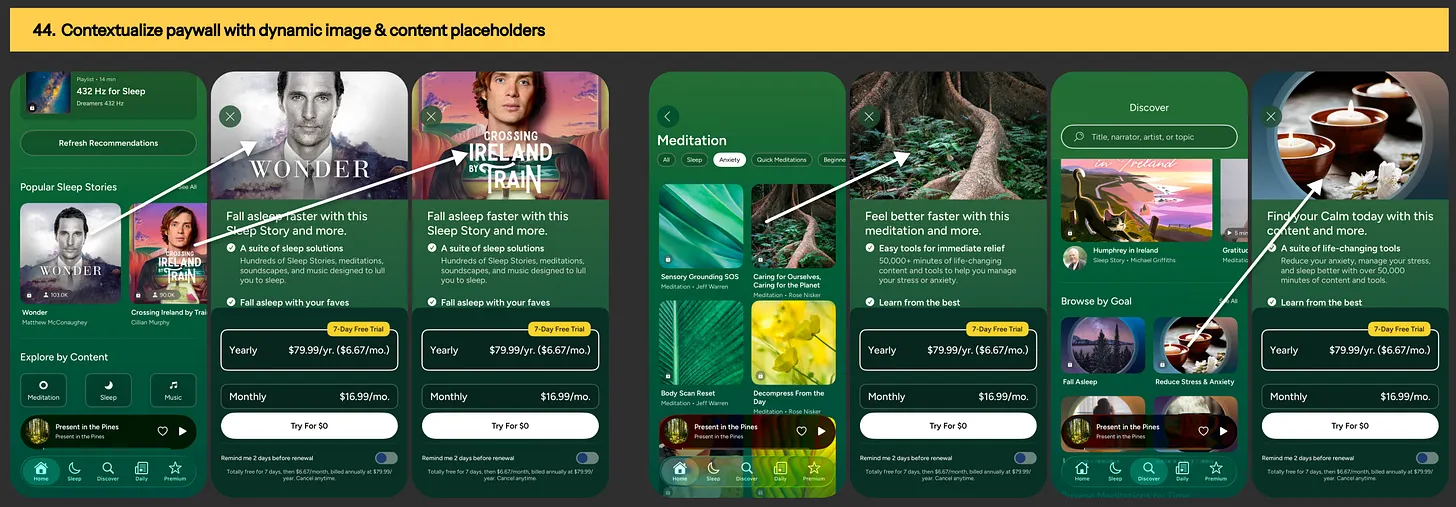
Image: Paywall personalization using onboarding quiz inputs

Experiment #44: Contextualize paywall hero image & headline with dynamic content placeholders

Paywall personalization example from Calm app
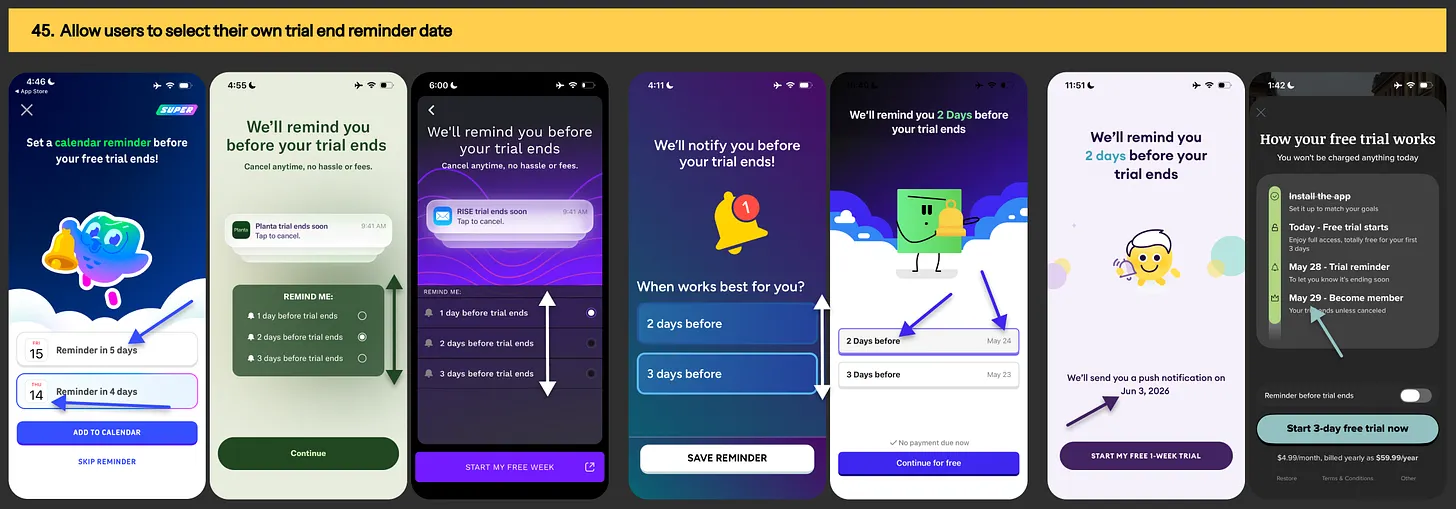
Image: Paywall personalization example from Calm app

Experiment #45: Tailor trial-end reminder notification based on users’ selected preference

 Trial-end reminder personalization examples from Duolingo, Planta, Rise, Fish AI, MyMentalPal, Yuno & Vocab app
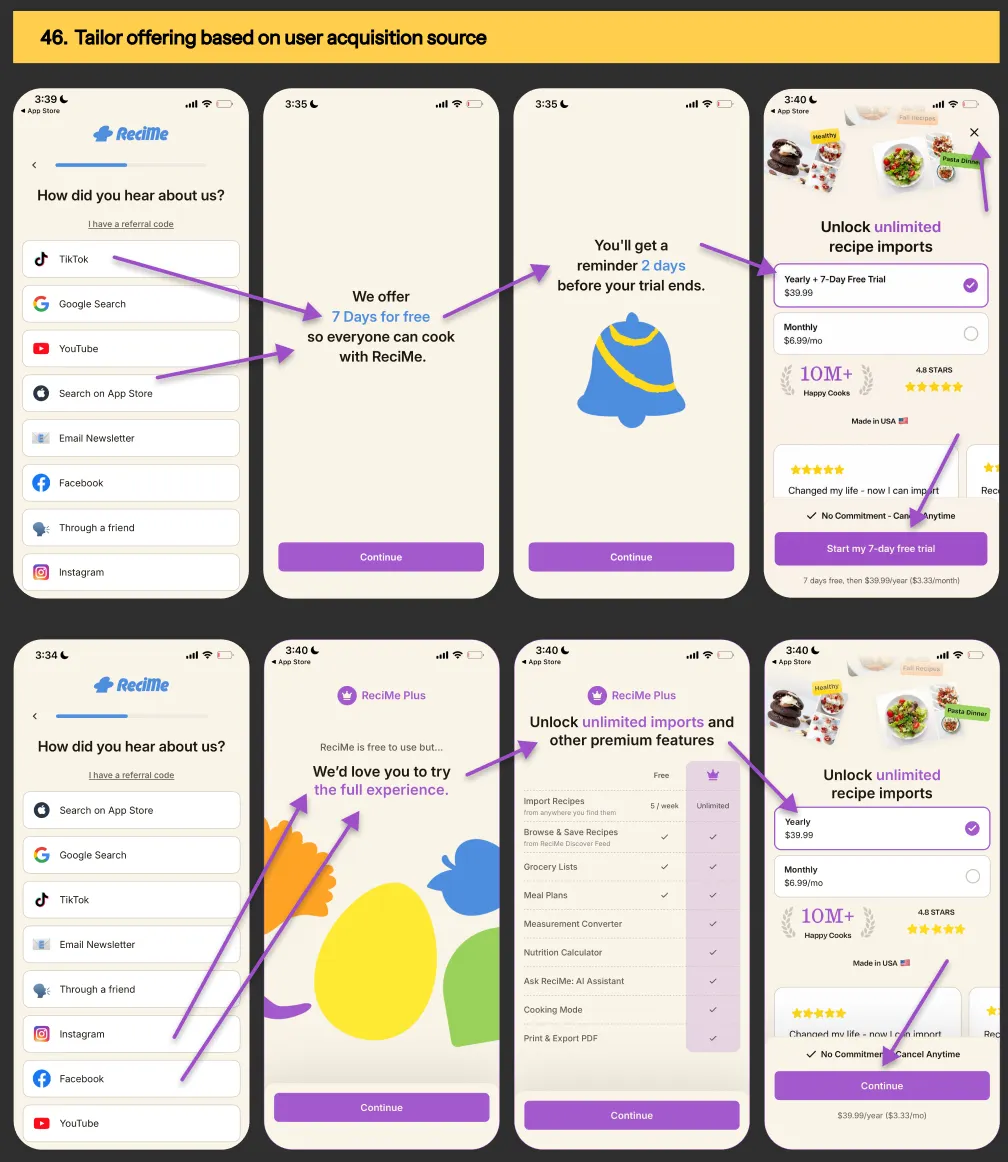
Image: Trial-end reminder personalization examples from Duolingo, Planta, Rise, Fish AI, MyMentalPal, Yuno & Vocab app

Experiment #46: Tailor offering based on user acquisition source

Paywall offering personalization hypothesis using ReciMe meal planner app's HDYHAU question

Image: Paywall offering personalization hypothesis using ReciMe meal planner app's HDYHAU question
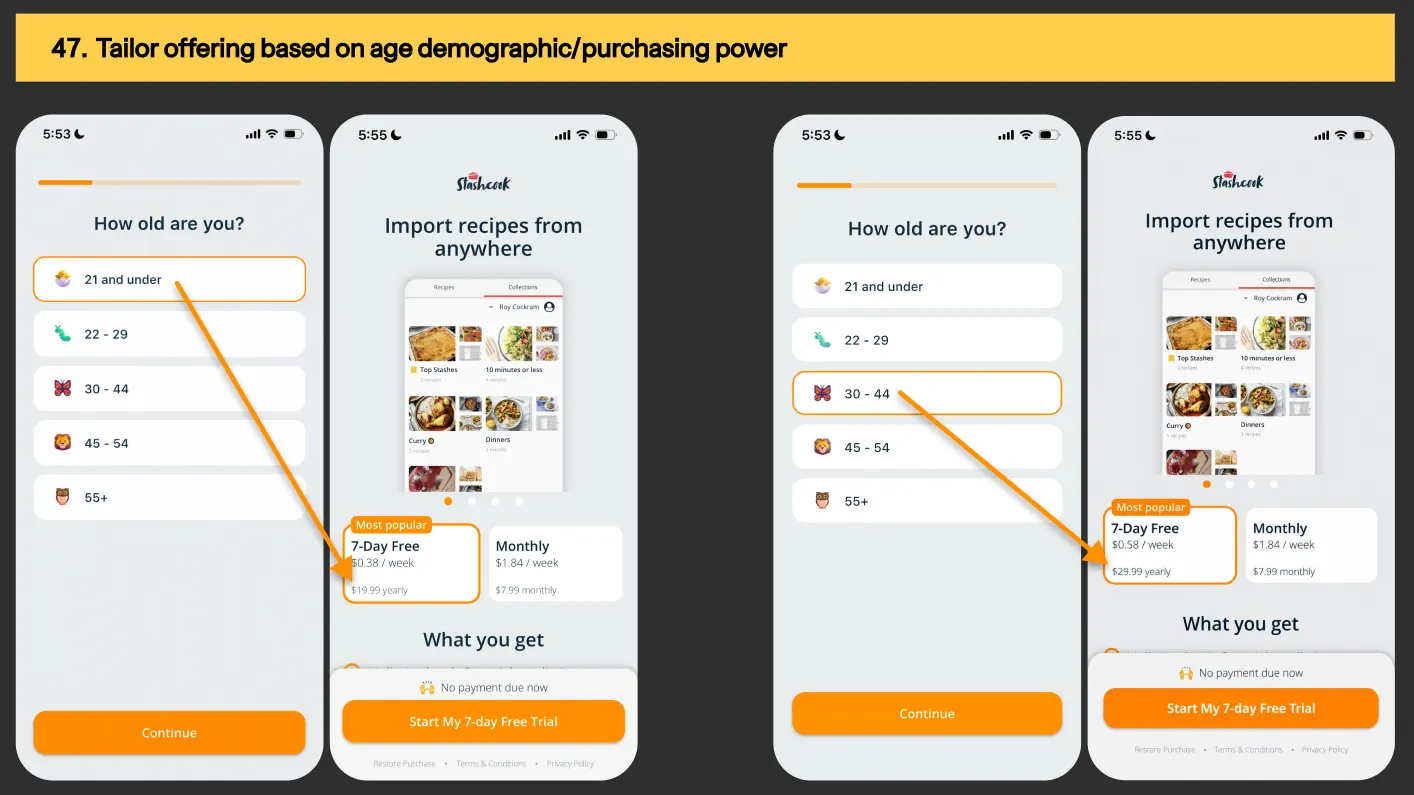
Experiment #47: Tailor offering based on age demographic / purchasing power

 Paywall personalization example based on user's age group or purchasing power
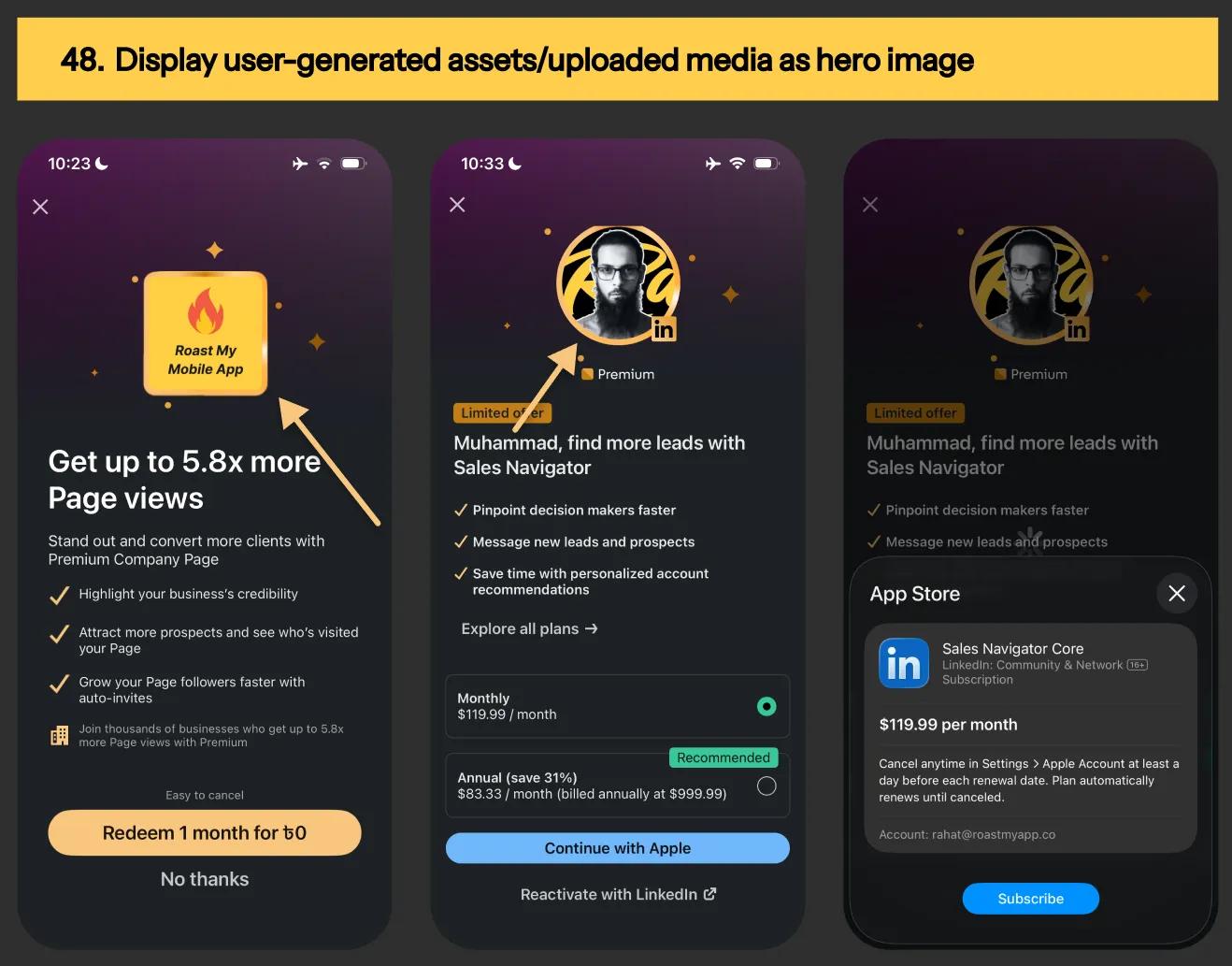
Image: Paywall personalization example based on user's age group or purchasing power

Experiment #48: Display user-generated assets/uploaded media as hero image

Paywall personalization example from LinkedIn app
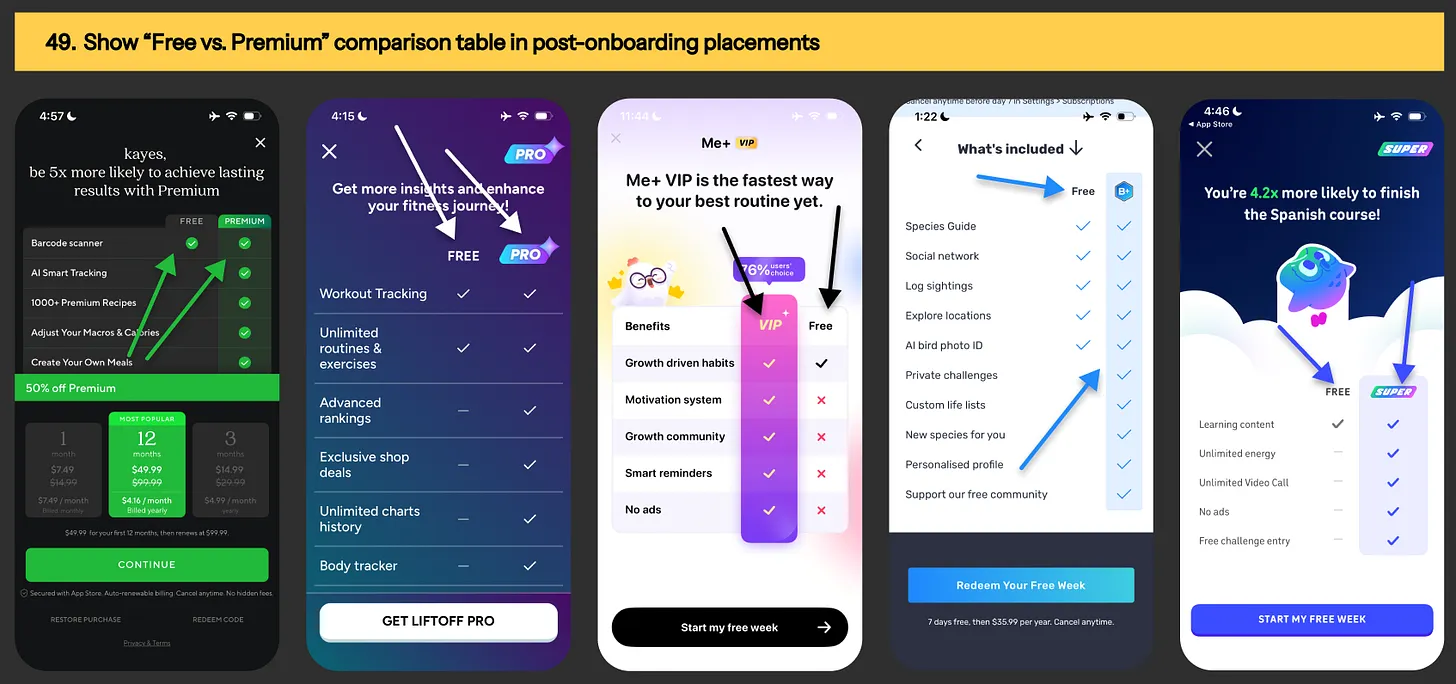
Image: Paywall personalization example from LinkedIn app

Experiment #49: Tailor paywall content based on specific points of user journey & level of intent

Paywall personalization example based on user intent
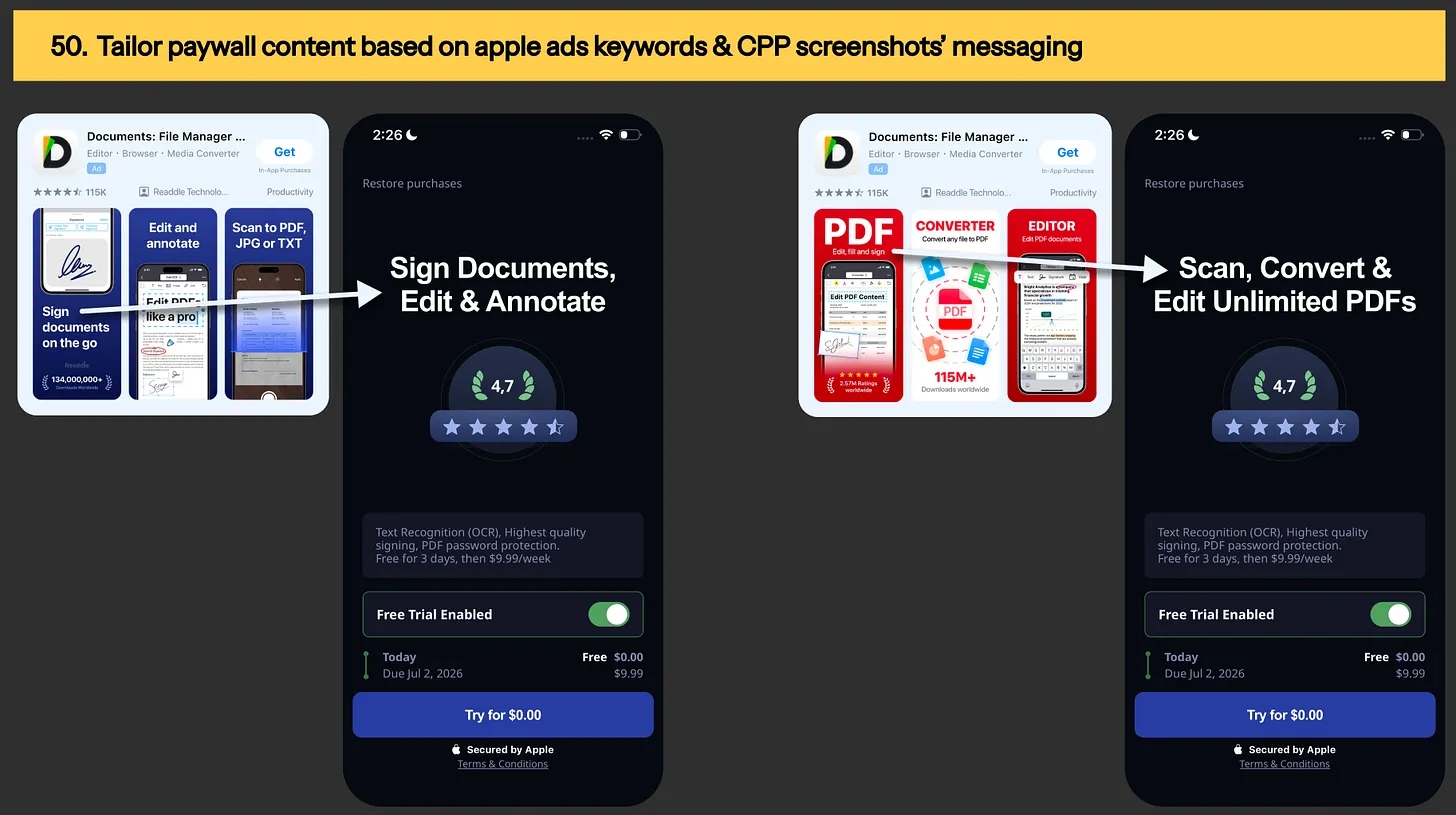
Image: Paywall personalization example based on user intent

Experiment #50: Tailor paywall content based on Apple ads keywords & CPP screenshots’ messaging

Tailored paywall content based on Apple ad keywords
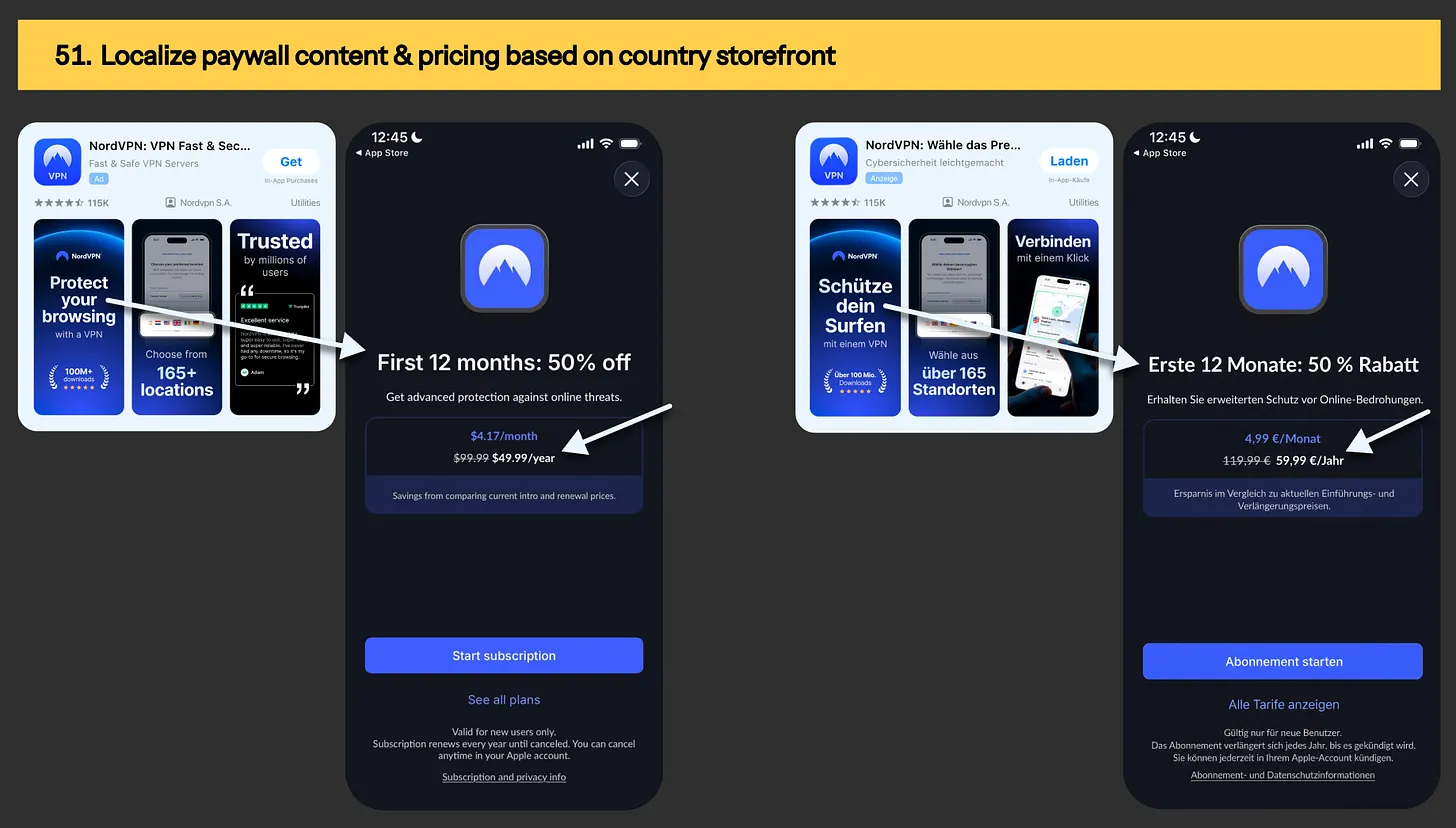
Image: Tailored paywall content based on Apple ad keywords

Experiment #51: Localize paywall content & pricing based on country storefront

Paywall personalization based on country storefront

Image: Paywall personalization based on country storefront

Frequently asked questions

What are the 5 mobile app monetization levers?

The 5 levers are paywall design and setup, pricing and offering, content and messaging, promotion offers, and personalization.

Every one of the 51 experiments on this page sits inside one of them. Structuring your backlog by lever instead of by random idea is what lets you understand which part of your monetization setup actually moves revenue.

Run one lever at a time. Testing a headline this week and a price next week gives you wins you cannot attribute to anything.

Which paywall experiment should I run first?

Start where your funnel is leaking hardest, not where the idea is most interesting. If fewer than 60% of installs ever reach your paywall, fix placement first.

If people see it and bounce, start with paywall design and messaging. If they start trials and do not convert, work on pricing and offering.

If they convert and churn, look at your trial timeline, cancellation flow and reminder settings.

Picking the wrong first experiment does not just cost you a sprint. At low volume it can cost you a quarter.

Can I run paywall experiments if my app has low download volume?

Low volume means you need a bigger effect to detect anything at all, so micro-copy tests are a waste of the traffic you have.

Go for structural changes with large expected swings: single-screen versus multi-step, a different pricing and packaging structure, adding an exit offer, or a reverse trial.

Accept a longer runtime and calculate the sample you need up front instead of calling the test when it starts looking good. Most low-volume apps are not blocked by traffic. They are blocked by testing things too small to measure.

Is my app too small to invest in paywall optimization?

If your app is making $1,000 to $5,000 a month in proceeds, a full monthly monetization program wouldn't be the right purchase.

That is exactly why our $1k paywall experiment offer exists. You get one high-leverage experiment identified, designed and briefed without committing to a monthly retainer or paying for a research phase your revenue cannot justify yet.

Most teams start here to find out whether we work well together before committing long-term.

Do I need RevenueCat or Superwall to run these paywall experiments?

No. Plenty of teams run these natively in Swift or React Native, and if you are already comfortable shipping code, native is often faster than learning a new SDK in the middle of a build.

No-code monetization tools like RevenueCat, Superwall, Adapty and Purchasely make iteration faster once your experiment cadence picks up, but they are a convenience rather than a requirement.

What matters far more is clean event tracking with a placement property on your paywall view event, and cohorting by install date rather than event date.

Can I stack multiple changes into one paywall experiment?

Stacking costs you attribution. You will know the new setup beat the old one but not which specific change did it. That is a fair trade when you cannot afford to isolate variables and you need a revenue result now.

The real mistake is stacking without admitting it, then trying to explain the result afterwards. Decide up front whether the experiment is answering does this direction work or which specific change works, and design it to match

What happens after I book 1 paywall experiment with your Stripe link?

I find your highest-leverage monetization experiments. You and I then prioritise and pick one growth initiative to deploy.

You get custom design and copy in Figma ready for your team to implement, plus a hypothesis-impact brief with the problem, the solution hypothesis, primary success metrics and guardrail metrics defined up front.

After the experiment ends you get my recommended next initiatives based on what we learned. No pitch deck and no forty-slide strategy document.

What happens if the experiment fails to lift my revenue?

Many experiments eventually lose. That is what running them honestly looks like, and a documented loss still teaches you something about your users that you did not know before.

Here is my commitment either way: whichever option a team picks, I stick around for free until you hit positive ROI on my services. If you would rather see where your revenue is leaking before spending anything at all, start with the free CRO audit.
Final thoughts

If I were you, I would not blindly run these curated experiments. People landing on your paywall are coming with a completely different intent than the ones you just saw above. [Different demographic. Different channels. Different age group. And different problems needing to be solved.]

Here are 2 scenarios I see happening…

  1. Teams that compound their revenue are the ones continuously testing, continuously finding new winners, & adjusting their paywall based on what’s working top of the funnel [eg. ugc, ad creatives, keywords, & onboarding]
  2. Teams operating on “ship and forget” mode where the paywall goes live, nobody touches it for months on end while your traffic keeps changing, and the revenue sits exactly where it was.

If you’re stuck at scenario #2, you should try this exact, stress-tested framework I use to help teams go from “running experiments on guesswork” to building their compounding revenue growth system. Go check it out with the button below…

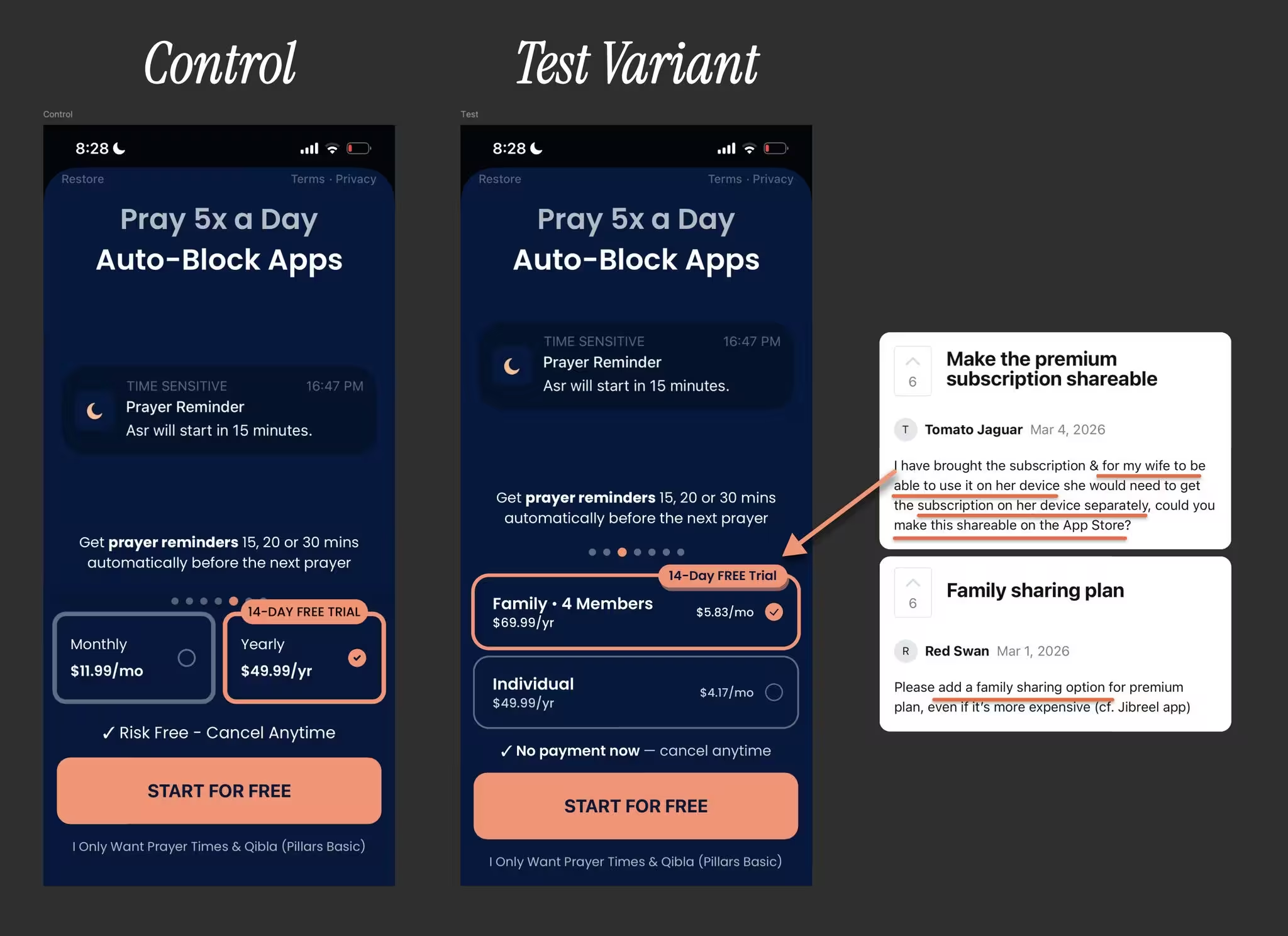
Paywall test variant design for pillars prayer tracker app

Need to see where your mobile app's leaking revenue right now?

Start with a free CRO audit of your app where we schedule a 30-minute coffee chat on Google Meet to go through your mobile app's current paywall & onboarding setup together. No pitch deck, no strings attached.

By the end, you walk away knowing the 3 biggest blockers costing you real money. if we think our monetization & CRO program isn't a good fit for your app, we'll tell you that too.

Find more about Roastmyapp's mobile app monetization & CRO framework here →

Best,
Muhammad Rahat
Founder @ Roast My App LLC

muhammad rahat's profile picture
💸
Mobile App Monetization & CRO Program
4+ paywall experiments & 2+ onboarding funnel iterations per month (at least)
Payments secured by Stripe
Implementation support on revenuecat/superwall/custom-code
20-40%+ ARPU growth potential per sprint
1:
Focus areas  ⤵
Paywall design, pricing, packaging, placements & personalization
Onboarding funnel design & conversion efficiency to paying customers
Post-purchase UX, retention offer & subscription cancellation flow
2:
How it works  ⤵
We find your highest-leverage paywall & onboarding experiments to run next
We plug into your team to design, code & deploy the growth experiments for you
You move from random testing to systematic growth—without pulling your engineers off core product work
3: 
What we need  ⤵
Read-only analytics access [appstore connect, revenuecat/SW, amplitude/posthog]
Context on what's working top-of-the-funnel [keywords, scripts, best-performing ad creatives & angles you know convert]
Existing research materials [interview transcripts, surveys, reviews, feature requests, support tickets]
Existing experimentation backlog + designs & data from previous tests
Ship better-performing onboarding & paywalls like...

Ask Claude AI